

Mastering Azure Function Triggers: A Complete Guide with Real-World Examples
TABLE OF CONTENTS
- Azure Function Triggers
- HTTP Trigger Function – Build Lightweight APIs
- Timer Trigger Function—Scheduled Jobs (CRON)
- CRON Expression Format
- Queue Trigger Function – Asynchronous Processing
- Blob Trigger Function – File-Based Workflows
- Event Grid Trigger Function – Event-Driven Architecture
- Orchestration Function (Durable) – Manage Complex Workflows
- Cosmos DB Trigger – Real-Time Data Processing
- How to Create and Deploy Azure Functions
- Limitations of Azure Functions
- Conclusion
- Stay ahead of the curve
Share on Social Media
Related Blogs

Mobile App Development Trends for 2025:How We Help Businesses Stay Ahead
Read More: Mobile App Development Trends for 2025:How We Help Businesses Stay Ahead
Secure Your React Native App with Keycloak Authentication: Comprehensive Guide
Read More: Secure Your React Native App with Keycloak Authentication: Comprehensive Guide
How to implement ABCDE method for time management
Read More: How to implement ABCDE method for time management
Generative AI and Its Impact: Everything You Need to Know About This Creative Technology
Read More: Generative AI and Its Impact: Everything You Need to Know About This Creative Technology
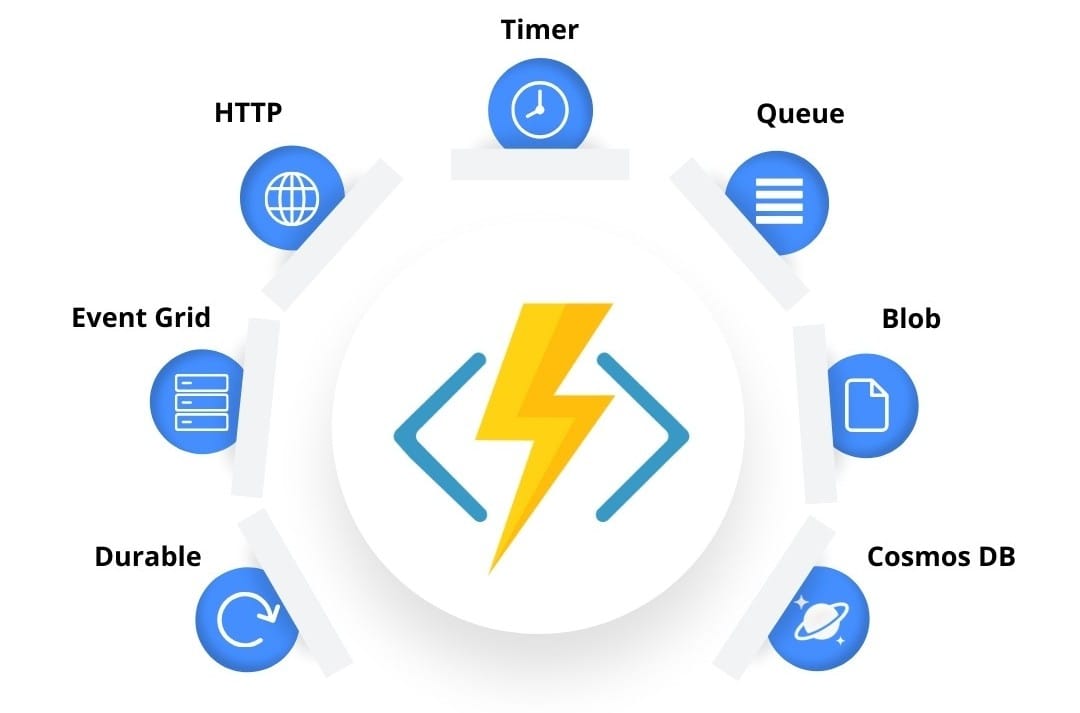
Serverless computing is revolutionizing the way developers build and scale applications — and Azure Functions are at the heart of this shift in the Microsoft ecosystem. These lightweight, event-driven components let you run code without provisioning or managing infrastructure. In this blog, we’ll explore 7 essential Azure Function triggers, each explained with a real-world scenario and C# sample code.
Azure Function Triggers
Get practical guidance on structuring complex SQL queries
Book a free consultationHTTP Trigger Function – Build Lightweight APIs
An HTTP Trigger Function enables you to create RESTful endpoints that respond to HTTP GET or POST requests — perfect for APIs, form submissions, or integrations.
Sample Use Case: Hello API
[FunctionName("HttpTriggerExample")]
public static IActionResult Run(
    [HttpTrigger(AuthorizationLevel.Function, "get", "post")] HttpRequest req)
{
    string name = req.Query["name"];
    return new OkObjectResult($"Hello, {name}!");
}
Timer Trigger Function—Scheduled Jobs (CRON)
Timer triggers are ideal for automating background jobs like daily reports, reminders, or data cleanups using a CRON expression.
Real Use Case: Daily Sales Report at 7:00 AM
[FunctionName("DailySalesReport")]
public static async Task Run(
    [TimerTrigger("0 0 7 * * *")] TimerInfo myTimer,
    ILogger log)
{
    log.LogInformation($"Function executed at: {DateTime.UtcNow}");
    var salesData = await GetDailySalesDataAsync();
    var report = GenerateReport(salesData);
    await SendEmailAsync(report);
}
CRON Expression Format
| Expression | Description |
|---|---|
| 0 */5 * * * * | Every 5 minutes |
| 0 0 7 * * * | Every day at 7 AM UTC |
| 0 0 9 * * 1 | Every Monday at 9 AM UTC |
Queue Trigger Function – Asynchronous Processing
Queue triggers let you respond to new messages in Azure Storage Queues, ideal for order processing, background jobs, or email sending.
Sample Use Case: Order Fulfillment
[FunctionName("ProcessOrder")]
public static async Task Run(
    [QueueTrigger("orders-queue", Connection = "AzureWebJobsStorage")] string orderMessage,
    ILogger log)
{
    var order = JsonConvert.DeserializeObject<Order>(orderMessage);
    log.LogInformation($"Processing order #{order.OrderId} for {order.CustomerName}");
    await Task.Delay(2000); // simulate work
}
Blob Trigger Function – File-Based Workflows
Blob triggers automatically run when a new file (e.g., PDF, image) is uploaded to Azure Blob Storage — excellent for document processing, image resizing, or metadata extraction.
Use Case: Invoice Processing
[FunctionName("ProcessInvoice")]
public static async Task Run(
    [BlobTrigger("invoices/{name}", Connection = "AzureWebJobsStorage")] Stream invoiceBlob,
    string name,
    ILogger log)
{
    using var reader = new StreamReader(invoiceBlob);
    string fileContent = await reader.ReadToEndAsync();
    log.LogInformation($"Invoice '{name}' read with {fileContent.Length} characters");
}
Event Grid Trigger Function – Event-Driven Architecture
Azure Event Grid lets you build real-time, event-driven solutions that react to Azure resource changes, blob uploads, or custom events.
Use Case: Auto-Archive Deallocated VMs
[FunctionName("VMDeallocationEventHandler")]
public static async Task Run(
    [EventGridTrigger] EventGridEvent eventGridEvent,
    ILogger log)
{
    JObject data = eventGridEvent.Data as JObject;
    string vmName = data["resource"]?.ToString();
    log.LogInformation($"Archiving VM: {vmName}");
    await Task.Delay(500); // simulate archive
}
Orchestration Function (Durable) – Manage Complex Workflows
Durable Functions let you orchestrate workflows by chaining multiple functions together, maintaining state and ensuring reliability even across retries and restarts.
Use Case: Order Workflow
Orchestrator:
[FunctionName("OrderOrchestrator")]
public async Task RunOrchestrator(
    [OrchestrationTrigger] IDurableOrchestrationContext context)
{
    var orderId = context.GetInput<string>();
    await context.CallActivityAsync("ValidateOrder", orderId);
    await context.CallActivityAsync("ProcessPayment", orderId);
    await context.CallActivityAsync("SendConfirmationEmail", orderId);
}
Activity Functions:
[FunctionName("ValidateOrder")]
public Task ValidateOrder([ActivityTrigger] string orderId, ILogger log) =>
    Task.CompletedTask;
HTTP Starter:
[FunctionName("StartOrderProcessing")]
public async Task<HttpResponseMessage> Start(
    [HttpTrigger(AuthorizationLevel.Function, "post")] HttpRequestMessage req,
    [DurableClient] IDurableOrchestrationClient starter,
    ILogger log)
{
    var orderId = await req.Content.ReadAsStringAsync();
    string instanceId = await starter.StartNewAsync("OrderOrchestrator", orderId);
    return starter.CreateCheckStatusResponse(req, instanceId);
}
Cosmos DB Trigger – Real-Time Data Processing
React to insert, update, or delete operations in your Cosmos DB collection. Great for syncing changes, sending notifications, or triggering data pipelines.
Use Case: Process Document Changes
[FunctionName("CosmosDBChangeHandler")]
public static void Run(
    [CosmosDBTrigger(
        databaseName: "YourDatabaseName",
        collectionName: "YourCollectionName",
        ConnectionStringSetting = "CosmosDBConnectionString",
        LeaseCollectionName = "leases",
        CreateLeaseCollectionIfNotExists = true)] IReadOnlyList<Document> documents,
    ILogger log)
{
    foreach (var document in documents)
    {
        log.LogInformation($"Document changed: {document.GetPropertyValue<string>("id")}");
    }
}
How to Create and Deploy Azure Functions
1. Create a Function App in the Azure Portal
2. Choose Your Trigger Type (HTTP, Timer, etc.)
3. Write & Deploy Code via Azure Portal or Visual Studio Code
4. Monitor Logs & Execution in the Monitor tab
Limitations of Azure Functions
- Cold Starts: Can be slow on the first call.
- Timeouts: Consumption plan limits (5 minutes default, 60 max).
- State Management: Must use Durable Functions or external storage.
- Vendor Lock-In: Heavily tied to Azure ecosystem.
Conclusion
Azure Functions offer a cost-effective, scalable, and developer-friendly approach to building serverless applications. From APIs and scheduled jobs to workflow orchestration and real-time event processing, they allow you to focus on business logic while Azure handles the rest.
Whether you’re building your first function or designing a complex distributed system, Azure Functions can dramatically accelerate your cloud journey.
Stay ahead of the curve
Get the latest insights, tutorials, and industry news delivered straight to your
inbox. Join 10,000+ developers and tech leaders.