

TABLE OF CONTENTS
Share on Social Media
Related Blogs

Unlocking Business Success Online: Why Businesses Need The Best Digital Marketing Services in 2024
Read More: Unlocking Business Success Online: Why Businesses Need The Best Digital Marketing Services in 2024
Mastering Azure Function Triggers: A Complete Guide with Real-World Examples
Read More: Mastering Azure Function Triggers: A Complete Guide with Real-World Examples
How to Execute Parallel Processing with Powershell?
Read More: How to Execute Parallel Processing with Powershell?
What is Docker? How to Deploy and Install Redis in Docker
Read More: What is Docker? How to Deploy and Install Redis in Docker
The HTML Table is not as flexible as DIV structures, but it is useful for sorting multiple data sets in proper order. However, it has its limitations, such as the inability to alter the <tr> and <td> structures.
It may not be necessary to change the default table property for desktops, but for mobile devices, the only option is to scroll, which is inconvenient for users.
How can we make it easy and more familiar?
Styling an HTML Table was never so easy before. HTML Tables allow the reader to see results or conclusions at a glance, rather than poring over text to find the numeric data or points.
The <table> is used for display data in tabular form (row * column). A table is a quick and easy way to find values that indicate some relatable differences between the type of data.
Note
Table Data elements are the data containers of the table. They can contain all HTML elements like; text, images, lists, other tables, etc.
Core Components of HTML Table
An HTML table consists of one <table> element and one or more <tr>, <th>, and elements. The <tr> element defines a table row, the <th> element defines a table header, and the <td> element defines a table cell. An HTML table may also include <caption>, <colgroup>, <thead>, <tfoot>, and <tbody> elements.
HTML <thead>elements is used to define header of an HTML table.
The <thead>tag is used along with <tbody>and <tfoot>tags which defines table header, table body, and table footer in an HTML table.
HTML <tbody>tag is used to group the table rows (<tr>) together, which indicates that this is body part of a table (<table>).
The <tbody>element should always come after a <thead>element and may come before or after a <tfoot>element.
HTML <tfoot>element is used to define the footer of an HTML table.
The <tfoot>can be placed either before or after <tbody>and <tr>elements.
Note
The <thead>, <tbody>, and <tfoot>elements do not affect the table layout, and if you want to apply the changes in table layout, then use CSS properties.
The individual table cells are always one of two elements: <td>or <th>. You can put whatever you want inside a table cell, but these components make them a table cell. <th>elements are tabular headers and <td>elements are tabular data.
Difficulty in making Tables Responsive Design
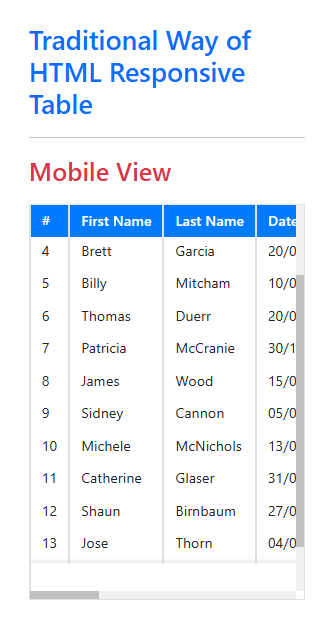
Responsive tables are essential while displaying table data on different screens and devices like desktop, laptop, mobile, etc. With the use of media queries, we can change the style of the table as per the device viewing it.
By default, showing horizontal scroll for table responsive on small devices is known the traditional way.
Traditional Way
HTML
<div class="p-5">
  <div class="pb-4 px-0 px-lg-4 row">
    <div class="col-12">
      <h2 class="text-primary">Traditional Way of HTML Responsive Table</h2>
      <hr>
      <h3 class="text-success d-none d-md-block mb-3">Desktop View</h3>
      <h3 class="text-danger d-md-none mb-3">Mobile View</h3>
      <div class="border cm-scrollbar cm-table-w-scroll table-responsive">
        <table class="table table-borderless table-sm table-bordered">
          <thead>
            <tr class="bg-primary">
              <th>#</th>
              <th>First Name</th>
              <th>Last Name</th>
              <th>Date of Birth</th>
              <th>Email</th>
              <th>Phone</th>
              <th>Occupation</th>
              <th>Company</th>
            </tr>
          </thead>
          <tbody>
            <tr>
              <td>1</td>
              <td>Joseph</td>
              <td>Thompson</td>
              <td>20/09/1983</td>
              <td> joseph@gmail.com </td>
              <td> 815-398-#### </td>
              <td> Foundry mold and coremaker </td>
              <td> Desert Garden Help </td>
            </tr>
            <tr>
              <td>2</td>
              <td>Lynn</td>
              <td>Rodman</td>
              <td>20/09/1988</td>
              <td> lynn.rodman@dayrep.com </td>
              <td> 972-763-#### </td>
              <td> Geotechnical engineer </td>
              <td> New World Realty </td>
            </tr>
            <tr>
              <td>3</td>
              <td>Monica</td>
              <td>Yocum</td>
              <td>18/03/1964</td>
              <td> contact@monica.com </td>
              <td> 586-350-#### </td>
              <td> Assistant editor </td>
              <td> Happy Family </td>
            </tr>
            <tr>
              <td>4</td>
              <td>Brett</td>
              <td>Garcia</td>
              <td>20/09/1997</td>
              <td> brett.garcia@sambos.com </td>
              <td> 574-735-#### </td>
              <td> Polisher </td>
              <td> Sambo's </td>
            </tr>
            <tr>
              <td>5</td>
              <td>Billy</td>
              <td>Mitcham</td>
              <td>10/05/1994</td>
              <td> billy.mitcham@teleworm.us</td>
              <td> 818-723-#### </td>
              <td> Product designer </td>
              <td> Audio Visions </td>
            </tr>
            <tr>
              <td>6</td>
              <td>Thomas</td>
              <td>Duerr</td>
              <td>20/09/1997</td>
              <td> thomas-duerr@jourrapide.com</td>
              <td> 715-578-#### </td>
              <td>Service technician</td>
              <td>Destiny Realty</td>
            </tr>
            <tr>
              <td>7</td>
              <td>Patricia</td>
              <td>McCranie</td>
              <td>30/11/1999</td>
              <td> patricia239@mccranie.com </td>
              <td>440-266-####</td>
              <td>Risk manager</td>
              <td>Herman's World</td>
            </tr>
            <tr>
              <td>8</td>
              <td>James</td>
              <td> Wood</td>
              <td>15/08/1996</td>
              <td> james-wood@shareorbuy.com </td>
              <td> 574-735-#### </td>
              <td> Power tool repairer </td>
              <td> Shareor Buy </td>
            </tr>
            <tr>
              <td>9</td>
              <td>Sidney</td>
              <td>Cannon</td>
              <td>05/07/1988</td>
              <td> s-cannon@alp.com </td>
              <td> 615-424-#### </td>
              <td> Pesticide sprayer </td>
              <td> A. L. Price </td>
            </tr>
            <tr>
              <td>10</td>
              <td>Michele </td>
              <td>McNichols</td>
              <td>13/05/1994</td>
              <td> michele@record-town.com </td>
              <td> 615-896-#### </td>
              <td> Otorhinolaryngology nurse </td>
              <td> Record Town </td>
            </tr>
            <tr>
              <td>11</td>
              <td>Catherine</td>
              <td>Glaser</td>
              <td>31/03/1995</td>
              <td> catherine@play-town.com </td>
              <td> 410-219-#### </td>
              <td> Resort desk clerk </td>
              <td> Play Town </td>
            </tr>
            <tr>
              <td>12</td>
              <td>Shaun</td>
              <td>Birnbaum</td>
              <td>27/02/1987</td>
              <td>shaun@caltereo.com</td>
              <td>248-304-####</td>
              <td>Terrazzo worker</td>
              <td> Cal Stereo </td>
            </tr>
            <tr>
              <td>13</td>
              <td>Jose</td>
              <td>Thorn</td>
              <td>04/06/1993</td>
              <td> jose@star-interior-design.com </td>
              <td> 972-919-#### </td>
              <td> Construction engineer </td>
              <td> Star Interior Design </td>
            </tr>
            <tr>
              <td>14</td>
              <td>Kimberly</td>
              <td>Horne</td>
              <td>12/04/1997</td>
              <td> kimberly@pennfruit.com </td>
              <td> 615-483-#### </td>
              <td> Children's librarian</td>
              <td> Penn Fruit </td>
            </tr>
            <tr>
              <td>15</td>
              <td>Mario</td>
              <td>Potter</td>
              <td>09/12/1996</td>
              <td> mario-p@clemensmarkets.com </td>
              <td> 615-896-#### </td>
              <td> Local controller </td>
              <td> Clemens Markets </td>
            </tr>
          </tbody>
          <tfoot>
            <tr>
              <td colspan="8" class="bg-white text-center"> <span class="text-danger">*</span>We have used this data for demo purposes only. </td>
            </tr>
          </tfoot>
        </table>
      </div>
    </div>
  </div>
</div>
CSS
EDIT ON
.cm-scrollbar::-webkit-scrollbar {
    width: 8px;
    height: 8px;
}

.cm-scrollbar::-webkit-scrollbar-track {
    background: #f1f1f1;
}

.cm-scrollbar::-webkit-scrollbar-thumb {
    background: #c1c1c1;
}

.cm-scrollbar::-webkit-scrollbar-thumb:hover {
    background: #919191;
}

.cm-table-w-scroll {
    position: relative;
    width: 100%;
    z-index: 1;
    margin: auto;
    overflow: auto;
    max-height: 360px;
}

.cm-table-w-scroll table {
    width: 100%;
    margin: auto;
    border-collapse: separate;
    border-spacing: 0;
}

.cm-table-w-scroll table th,
.cm-table-w-scroll table td {
    font-size: 13px;
    padding: 5px 10px;
    vertical-align: top;
    white-space: nowrap;
}

.cm-table-w-scroll thead th {
    background: #007bff; /* set background color for the overcome transparent header cell */
    color: #fff;
    position: -webkit-sticky; /* for Safari */
    position: sticky;
    top: 0;
    font-weight: 600;
}

.cm-table-w-scroll tfoot,
.cm-table-w-scroll tfoot th,
.cm-table-w-scroll tfoot td {
    position: -webkit-sticky; /* for Safari */
    position: sticky;
    bottom: -1px;
    background: #fff; /* set background color for the overcome transparent header cell */
    color: #555;
    font-size: 11px;
    z-index: 4;
    box-shadow: 0 0 5px 0 rgba(90, 90, 90, 0.15);
}

@media screen and (max-width:767px) {
    .cm-table-w-scroll table thead, .cm-table-w-scroll table tfoot {
        display: none;
    }

    .cm-table-w-scroll table tbody tr {
        display: block;
        margin: 10px 15px 20px;
        box-shadow: 0 0 5px 0 rgba(90, 90, 90, 0.5);
        border-radius: 4px;
    }

    .cm-table-w-scroll table tbody tr td[data-title]:before {
        content: attr(data-title);
        font-size: 13px;
        padding-right: 10px;
        font-weight: 500;
    }

    .cm-table-w-scroll table tbody tr td {
        display: flex;
        justify-content: space-between;
        white-space: normal;
        text-align: end;
    }

    .cm-table-w-scroll table tbody tr td:not(:last-child) {
        border-bottom: 1px solid rgb(204 204 204 / 32%) !important; /* !important to overcome bootstrap css */
    }

    .cm-table-w-scroll table th, .cm-table-w-scroll table td {
        padding: 10px;
    }

    .cm-table-w-scroll table thead tr th, .cm-table-w-scroll table tbody tr td {
        border-width: 0px;
        box-shadow: none;
    }
}
Result
Modern Way
HTML
<div class="p-5">
  <div class="pb-4 px-0 px-lg-4 row">
    <div class="col-12">
      <h2 class="text-primary">Modern Way of HTML Responsive Table</h2>
      <hr>
      <h3 class="text-success d-none d-md-block mb-3">Desktop View</h3>
      <h3 class="text-danger d-md-none mb-3">Mobile View</h3>
      <div class="border cm-scrollbar cm-table-w-scroll table-responsive">
        <table class="table table-borderless table-sm table-bordered">
          <thead>
            <tr class="bg-primary">
              <th>#</th>
              <th>First Name</th>
              <th>Last Name</th>
              <th>Date of Birth</th>
              <th>Email</th>
              <th>Phone</th>
              <th>Occupation</th>
              <th>Company</th>
            </tr>
          </thead>
          <tbody>
            <tr>
              <td data-title="#">1</td>
              <td data-title="First Name">Joseph</td>
              <td data-title="Last Name">Thompson</td>
              <td data-title="Date of Birth">20/09/1983</td>
              <td data-title="Email"> joseph@gmail.com </td>
              <td data-title="Phone"> 815-398-#### </td>
              <td data-title="Occupation"> Foundry mold and coremaker </td>
              <td data-title="Company"> Desert Garden Help </td>
            </tr>
            <tr>
              <td data-title="#">2</td>
              <td data-title="First Name">Lynn</td>
              <td data-title="Last Name">Rodman</td>
              <td data-title="Date of Birth">20/09/1988</td>
              <td data-title="Email"> lynn.rodman@dayrep.com </td>
              <td data-title="Phone"> 972-763-#### </td>
              <td data-title="Occupation"> Geotechnical engineer </td>
              <td data-title="Company"> New World Realty </td>
            </tr>
            <tr>
              <td data-title="#">3</td>
              <td data-title="First Name">Monica</td>
              <td data-title="Last Name">Yocum</td>
              <td data-title="Date of Birth">18/03/1964</td>
              <td data-title="Email"> contact@monica.com </td>
              <td data-title="Phone"> 586-350-#### </td>
              <td data-title="Occupation"> Assistant editor </td>
              <td data-title="Company"> Happy Family </td>
            </tr>
            <tr>
              <td data-title="#">4</td>
              <td data-title="First Name">Brett</td>
              <td data-title="Last Name">Garcia</td>
              <td data-title="Date of Birth">20/09/1997</td>
              <td data-title="Email"> brett.garcia@sambos.com </td>
              <td data-title="Phone"> 574-735-#### </td>
              <td data-title="Occupation"> Polisher </td>
              <td data-title="Company"> Sambo's </td>
            </tr>
            <tr>
              <td data-title="#">5</td>
              <td data-title="First Name">Billy</td>
              <td data-title="Last Name">Mitcham</td>
              <td data-title="Date of Birth">10/05/1994</td>
              <td data-title="Email"> billy.mitcham@teleworm.us</td>
              <td data-title="Phone"> 818-723-#### </td>
              <td data-title="Occupation"> Product designer </td>
              <td data-title="Company"> Audio Visions </td>
            </tr>
            <tr>
              <td data-title="#">6</td>
              <td data-title="First Name">Thomas</td>
              <td data-title="Last Name">Duerr</td>
              <td data-title="Date of Birth">20/09/1997</td>
              <td data-title="Email"> thomas-duerr@jourrapide.com</td>
              <td data-title="Phone"> 715-578-#### </td>
              <td data-title="Occupation">Service technician</td>
              <td data-title="Company">Destiny Realty</td>
            </tr>
            <tr>
              <td data-title="#">7</td>
              <td data-title="First Name">Patricia</td>
              <td data-title="Last Name">McCranie</td>
              <td data-title="Date of Birth">30/11/1999</td>
              <td data-title="Email"> patricia239@mccranie.com </td>
              <td data-title="Phone">440-266-####</td>
              <td data-title="Occupation">Risk manager</td>
              <td data-title="Company">Herman's World</td>
            </tr>
            <tr>
              <td data-title="#">8</td>
              <td data-title="First Name">James</td>
              <td data-title="Last Name"> Wood</td>
              <td data-title="Date of Birth">15/08/1996</td>
              <td data-title="Email"> james-wood@shareorbuy.com </td>
              <td data-title="Phone"> 574-735-#### </td>
              <td data-title="Occupation"> Power tool repairer </td>
              <td data-title="Company"> Shareor Buy </td>
            </tr>
            <tr>
              <td data-title="#">9</td>
              <td data-title="First Name">Sidney</td>
              <td data-title="Last Name">Cannon</td>
              <td data-title="Date of Birth">05/07/1988</td>
              <td data-title="Email"> s-cannon@alp.com </td>
              <td data-title="Phone"> 615-424-#### </td>
              <td data-title="Occupation"> Pesticide sprayer </td>
              <td data-title="Company"> A. L. Price </td>
            </tr>
            <tr>
              <td data-title="#">10</td>
              <td data-title="First Name">Michele </td>
              <td data-title="Last Name">McNichols</td>
              <td data-title="Date of Birth">13/05/1994</td>
              <td data-title="Email"> michele@record-town.com </td>
              <td data-title="Phone"> 615-896-#### </td>
              <td data-title="Occupation"> Otorhinolaryngology nurse </td>
              <td data-title="Company"> Record Town </td>
            </tr>
            <tr>
              <td data-title="#">11</td>
              <td data-title="First Name">Catherine</td>
              <td data-title="Last Name">Glaser</td>
              <td data-title="Date of Birth">31/03/1995</td>
              <td data-title="Email"> catherine@play-town.com </td>
              <td data-title="Phone"> 410-219-#### </td>
              <td data-title="Occupation"> Resort desk clerk </td>
              <td data-title="Company"> Play Town </td>
            </tr>
            <tr>
              <td data-title="#">12</td>
              <td data-title="First Name">Shaun</td>
              <td data-title="Last Name">Birnbaum</td>
              <td data-title="Date of Birth">27/02/1987</td>
              <td data-title="Email">shaun@caltereo.com</td>
              <td data-title="Phone">248-304-####</td>
              <td data-title="Occupation">Terrazzo worker</td>
              <td data-title="Company"> Cal Stereo </td>
            </tr>
            <tr>
              <td data-title="#">13</td>
              <td data-title="First Name">Jose</td>
              <td data-title="Last Name">Thorn</td>
              <td data-title="Date of Birth">04/06/1993</td>
              <td data-title="Email"> jose@star-interior-design.com </td>
              <td data-title="Phone"> 972-919-#### </td>
              <td data-title="Occupation"> Construction engineer </td>
              <td data-title="Company"> Star Interior Design </td>
            </tr>
            <tr>
              <td data-title="#">14</td>
              <td data-title="First Name">Kimberly</td>
              <td data-title="Last Name">Horne</td>
              <td data-title="Date of Birth">12/04/1997</td>
              <td data-title="Email"> kimberly@pennfruit.com </td>
              <td data-title="Phone"> 615-483-#### </td>
              <td data-title="Occupation"> Children's librarian</td>
              <td data-title="Company"> Penn Fruit </td>
            </tr>
            <tr>
              <td data-title="#">15</td>
              <td data-title="First Name">Mario</td>
              <td data-title="Last Name">Potter</td>
              <td data-title="Date of Birth">09/12/1996</td>
              <td data-title="Email"> mario-p@clemensmarkets.com </td>
              <td data-title="Phone"> 615-896-#### </td>
              <td data-title="Occupation"> Local controller </td>
              <td data-title="Company"> Clemens Markets </td>
            </tr>
          </tbody>
          <tfoot>
            <tr>
              <td colspan="8" class="bg-white text-center"> <span class="text-danger">*</span>We have used this data for demo purposes only. </td>
            </tr>
          </tfoot>
        </table>
      </div>
    </div>
  </div>
</div>
CSS
.cm-scrollbar::-webkit-scrollbar {
    width: 8px;
    height: 8px;
}

.cm-scrollbar::-webkit-scrollbar-track {
    background: #f1f1f1;
}

.cm-scrollbar::-webkit-scrollbar-thumb {
    background: #c1c1c1;
}

.cm-scrollbar::-webkit-scrollbar-thumb:hover {
    background: #919191;
}

.cm-table-w-scroll {
    position: relative;
    width: 100%;
    z-index: 1;
    margin: auto;
    overflow: auto;
    max-height: 360px;
}

.cm-table-w-scroll table {
    width: 100%;
    margin: auto;
    border-collapse: separate;
    border-spacing: 0;
}

.cm-table-w-scroll table th,
.cm-table-w-scroll table td {
    font-size: 13px;
    padding: 5px 10px;
    vertical-align: top;
    white-space: nowrap;
}

.cm-table-w-scroll thead th {
    background: #007bff; /* set background color for the overcome transparent header cell */
    color: #fff;
    position: -webkit-sticky; /* for Safari */
    position: sticky;
    top: 0;
    font-weight: 600;
}

.cm-table-w-scroll tfoot,
.cm-table-w-scroll tfoot th,
.cm-table-w-scroll tfoot td {
    position: -webkit-sticky; /* for Safari */
    position: sticky;
    bottom: -1px;
    background: #fff; /* set background color for the overcome transparent header cell */
    color: #555;
    font-size: 11px;
    z-index: 4;
    box-shadow: 0 0 5px 0 rgba(90, 90, 90, 0.15);
}

@media screen and (max-width:767px) {
    .cm-table-w-scroll table thead, .cm-table-w-scroll table tfoot {
        display: none;
    }

    .cm-table-w-scroll table tbody tr {
        display: block;
        margin: 10px 15px 20px;
        box-shadow: 0 0 5px 0 rgba(90, 90, 90, 0.5);
        border-radius: 4px;
    }

    .cm-table-w-scroll table tbody tr td[data-title]:before {
        content: attr(data-title);
        font-size: 13px;
        padding-right: 10px;
        font-weight: 500;
    }

    .cm-table-w-scroll table tbody tr td {
        display: flex;
        justify-content: space-between;
        white-space: normal;
        text-align: end;
    }

    .cm-table-w-scroll table tbody tr td:not(:last-child) {
        border-bottom: 1px solid rgb(204 204 204 / 32%) !important; /* !important to overcome bootstrap css */
    }

    .cm-table-w-scroll table th, .cm-table-w-scroll table td {
        padding: 10px;
    }

    .cm-table-w-scroll table thead tr th, .cm-table-w-scroll table tbody tr td {
        border-width: 0px;
        box-shadow: none;
    }
}
Result
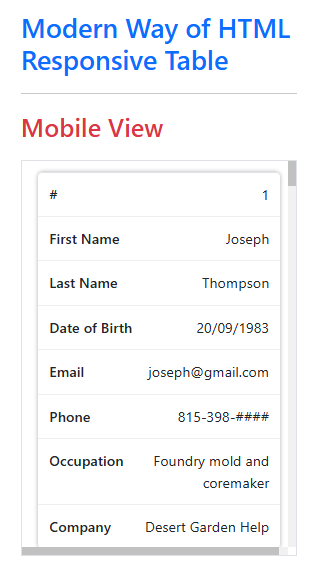
Here, we can easily convert our table to form-view using a combination of HTML and CSS
Step 1
To convert a table to a form-view, we need one attribute on the table data cell(<td>), which contains the label of that value.
e.g.
<td data-title="First Name">Joseph</td>Here data title is an attribute that contains Label for Data (Joseph).
That concludes our changes to HTML. Let’s go right into CSS.
Step 2
Now let’s move to the Desktop view first with Fix header and footer.
.cm-table-w-scroll table {
    width: 100%;
    margin: auto;
    border-collapse: separate;
    border-spacing: 0;
}
.cm-table-w-scroll thead th {
    background: #007bff; /* set background color for the overcome transparent header cell */
    color: #fff;
    position: -webkit-sticky; /* for Safari */
    position: sticky;
    top: 0;
    font-weight: 600;
}
.cm-table-w-scroll tfoot,
.cm-table-w-scroll tfoot th,
.cm-table-w-scroll tfoot td {
    position: -webkit-sticky; /* for Safari */
    position: sticky;
    bottom: -1px;
    background: #fff; /* set background color for the overcome transparent header cell */
    color: #555;
    font-size: 11px;
    z-index: 4;
    box-shadow: 0 0 5px 0 rgba(90, 90, 90, 0.15);
}
Position: sticky property used to make the table header and footer fixed.
Note
We need to apply a background color for the header and footer cells.
That settles the desktop view with a fixed header and footer table.
Let’s move to make responsive mobile views with some modern techniques.
Step 3
Now, let us make a responsive form-view table for devices smaller than tablets with some tweaks of the media query.
@media screen and (max-width:767px) {
    .cm-table-w-scroll table thead, .cm-table-w-scroll table tfoot {
        display: none; /* hide header and footer labels */
    }
    .cm-table-w-scroll table tbody tr {
        display: block;
        margin: 10px 15px 20px;
        box-shadow: 0 0 5px 0 rgba(90, 90, 90, 0.5);
        border-radius: 4px;
    }
    .cm-table-w-scroll table tbody tr td[data-title]:before {
        content: attr(data-title); /* this will show the label of data */
        font-size: 13px;
        padding-right: 10px;
        font-weight: 500;
    }
    .cm-table-w-scroll table tbody tr td {
        display: flex; /* this will align label and value in same line */
        justify-content: space-between;
        white-space: normal;
        text-align: end;
    }
}
Finally!, Using three steps, we can achieve table responsiveness with form view without extra plugins.
Note
The concept is that you can use data attributes to put information in HTML and use those attributes in CSS to achieve great things.
Conclusion
There is no single solution to make any <table> appropriately responsive without a scroll. However, the Modern Way Table gives better clearness of data in a meaningful way. Specifically in small devices such as mobiles. Also, it is more user-friendly and convenient.
Share on Social Media
Related Blogs

How to Start with Enterprise Mobile and IOT Strategy
Read More: How to Start with Enterprise Mobile and IOT Strategy
Sentry Logging: Improving Application Reliability and Performance
Read More: Sentry Logging: Improving Application Reliability and Performance
How to Use CTEs in MS SQL Server for Hierarchical Data and Query Optimization
Read More: How to Use CTEs in MS SQL Server for Hierarchical Data and Query Optimization
All About Docker file and Docker Compose: The Ultimate Guide for Developers
Read More: All About Docker file and Docker Compose: The Ultimate Guide for DevelopersStay ahead of the curve
Get the latest insights, tutorials, and industry news delivered straight to your
inbox. Join 10,000+ developers and tech leaders.