
Enhancing AI Capabilities with RAG in Node.js:A Step-by-Step Tutorial
TABLE OF CONTENTS
- What is RAG (Retrieval Augmented Generation)?
- 6 Step-Guide For Implementing RAG In Node.js:
- Explanation Of The Above Code:
- Conclusion
- Frequently Asked Questions (FAQs)
- What is Retrieval-Augmented Generation (RAG)?
- What Are The Benefits of Retrieval-Augmented Generation (RAG)?
- How Does Retrieval-Augmented Generation (RAG) Work?
- What Is The Difference Between Retrieval-Augmented Generation And Semantic Search?
- What Are The Diverse Approaches of RAG?
- Stay ahead of the curve
Share on Social Media
Related Blogs

13 Essential Backup Guidelines and Data Loss Prevention Techniques for Maximum Safety
Read More: 13 Essential Backup Guidelines and Data Loss Prevention Techniques for Maximum Safety
Everything You Need to Know About Digital Twin Technology: A Game Changer for Industries
Read More: Everything You Need to Know About Digital Twin Technology: A Game Changer for Industries
What is the behavior of Scope in AngularJS Directives?
Read More: What is the behavior of Scope in AngularJS Directives?
How to Responsive sticky Header, Footer In Html Table?
Read More: How to Responsive sticky Header, Footer In Html Table?Retrieval augmented generation (RAG) has gained significant attention in recent years for its ability to enhance AI capabilities. It combines retrieval techniques with design to improve performance and generate more accurate results. This approach supports the best of both worlds:
- Fast access to relevant information
- Cross-generational productivity
In this tutorial, we will walk through setting up a RAG AI pipeline in Node.js using LangChain and MongoDB as vector storage.

What is RAG (Retrieval Augmented Generation)?
Retrieval-Augmented Generation is a hybrid approach that pairs a retrieval model, which fetches relevant documents from a vast collection, with a generative AI model, which interprets and produces a coherent response based on the retrieved documents. This method is ideal for tasks where up-to-date and accurate information is essential, like question answering, code generation, and even customer service applications.
RAG meaning – it is a hybrid approach that fuses two AI capabilities:
1. Retrieval-based methods: These involve searching for relevant information from external sources, such as databases or document collections.
2. Generative models: These models generate text based on input prompts, providing coherent and context-aware responses.
How RAG Works:
1. Retrieve: The retrieval component queries a vector database to get the most relevant documents or data points based on the user’s input.
2. Generate: The generative model uses the retrieved documents to create a more nuanced and contextually accurate response.
The below diagram shows RAG architecture.
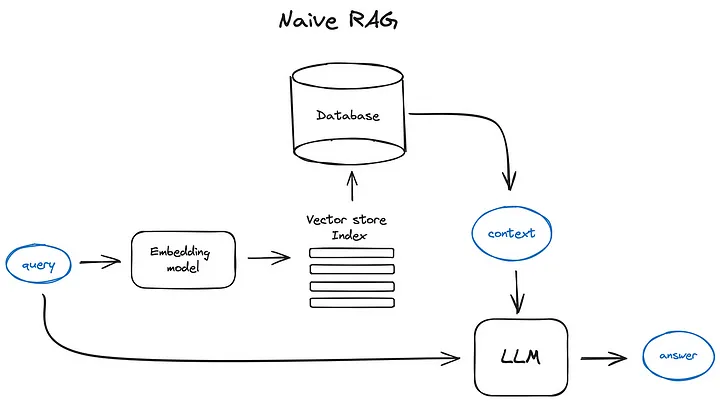
Let’s dive into how RAG operates by using Node.js alongside MongoDB as a vector database, powered by LangChain.
Setting Up RAG in Node.js:
This guide will help you set up a basic RAG pipeline in Node.js using LangChain, MongoDB as a vector store, and a small set of example data from text files.
Prerequisites:
Before starting, ensure you have the following installed:
- Node.js and npm
- MongoDB (you can use a local or hosted instance)
- LangChain, RAG llm-tools/embedjs and other required npm packages
The below diagram shows what we are going to implement RAG using embed js (Wrapper version of langchain for fast and easy integration), MongoDB as vector store and Query engine API.

6 Step-Guide For Implementing RAG In Node.js:
Implementing Retrieval-Augmented Generation (RAG) in Node.js allows developers to integrate advanced retrieval and generative AI techniques seamlessly. Why use RAG? It is crucial—it enhances AI’s ability to deliver accurate, context-aware responses by combining relevant data retrieval with generative capabilities. It is ideal for chatbots, document searches, and personalized content applications.
Pro Tip: Before diving in, ensure your development environment is set up with Node.js and the necessary packages.
Step 1: Initialize Your Project:
mkdir rag-nodejs-app
cd rag-nodejs-app
npm init -y
Step 2: Install Required Packages:
We’ll use Lang chain for RAG implementation and MongoDB as our vector store. So it’s necessary to have the proper installation of Lang Chain and Open AI Libraries.
npm i @llm-tools/embedjs
npm install @llm-tools/embedjs-mongodb
Step 3: Create A New .ENV file And Add The Required Environment Variables:
Set up a .env file in your project directory to securely store credentials like OPENAI_API_KEY. This file helps manage sensitive data without hardcoding it into your application.
OPENAI_API_KEY = <YOUR_OPEN_AI_API_KEY>cd rag-nodejs-app
npm init -y
Step 4: Create New Folders In Current Directory to Store Cache and Data Files :
Create directories in your project for storing cached data and other necessary files. This helps organize your project and ensures efficient data management during RAG implementation.
Step 5: Create A New File As An Index.js file & add below content:
Create a new index.js file in your project directory to implement the main application logic. This file will include the configuration for loading files, setting up the cache, connecting to the vector database, and handling search queries.
import "dotenv/config";
import * as path from "node:path";
import { RAGApplicationBuilder, TextLoader } from "@llm-tools/embedjs";
import { LmdbCache } from "@llm-tools/embedjs/cache/lmdb";
import { MongoDb } from "@llm-tools/embedjs/vectorDb/mongodb";
import * as fs from "fs";

import express from "express";
import cors from "cors";

const app = express();
app.use(express.json());
app.use(cors());

const port = 4000;
app.get("/initLoader", async (req, res) => {
  //From sample file add loaders.
  const llmApplication = await new RAGApplicationBuilder()
    .setCache(new LmdbCache({ path: path.resolve("./cache") }))
    .setVectorDb(
      new MongoDb({
        connectionString:
          "MONGODB_CONNECTION_URI",
      })
    )
    .build();

  const folderPath = "./files";
  // Read all files in the folder
  fs.readdir(folderPath, (err, files) => {
    if (err) {
      return console.error(`Unable to scan directory: ${err}`);
    }

    // Loop through the files
    for (const file of files) {
      const filePath = path.join(folderPath, file);

      // Perform an operation on each file, for example, log file name
      console.log(`Processing file: ${filePath}`);

      // You can read the file contents if needed
      fs.readFile(filePath, "utf8", async (err, data) => {
        if (err) {
          console.error(`Error reading file: ${err}`);
        } else {
          console.log(`File content of ${file}`);
          const fileType = getFileExtension(file);
          switch (fileType) {
            case "txt":
              await llmApplication.addLoader(new TextLoader({ text: data }));
              break;
            case "pdf":
              await llmApplication.addLoader(
                new PdfLoader({
                  filePathOrUrl: path.resolve(filePath),
                })
              );
            default:
              break;
          }
        }
      });
    }
  });

  res.send(200);
});

const getFileExtension = (fileName) => {
  return fileName.split(".").pop(); // Returns the last part after the last '.'
};

app.post("/searchQuery", async (req, res) => {
  const { searchText } = req.body;
  console.log("inside add loader Post call", req.body);
  const llmApplication = await new RAGApplicationBuilder()
    .setCache(new LmdbCache({ path: path.resolve("./cache") }))
    .setVectorDb(
      new MongoDb({
        connectionString:
          "MONGODB_CONNECTION_URI",
      })
    )
    .build();

let result = await llmApplication.query(searchText);
console.log(searchText, " ==> ", result.content);


  res.status(200).json({ result: result.content });
});


app.listen(port, () => {
  console.log(`Example app listening on port ${port}`);
});
Get the expert advice to grow your business digitally
Book a free consultationExplanation Of The Above Code:
1. Importing Dependencies
- dotenv: Loads environment variables from a .env file.
- path: Manages file and directory paths.
- @llm-tools/embedjs: Provides tools to create a RAG application using RAGApplicationBuilder, TextLoader, and MongoDB for vector database integration.
- fs: Handles file system operations, like reading directory contents.
- express and cors: Used to set up a web server that can handle JSON payloads and enable CORS for cross-origin requests.
2. Application Setup
- Express App Initialization: Creates an express app instance, allowing JSON body parsing and CORS.
- Port Setup: Sets the server to run on port 4000.
3. API Endpoints
- /initLoader (GET):
- Initializes the RAG application with an LMDB cache for caching embeddings and connects to a MongoDB vector database.
- Reads files from the ./files directory, processes each file based on its extension, and adds it to the RAG application as a loader:
- .txt files are processed using TextLoader.
- .pdf files are processed using a PdfLoader (though PdfLoader isn’t imported here, assuming it’s defined or available in the project).
- /searchQuery (POST):
- Takes a search query (searchText) from the request body, creates a new RAG application instance, and uses the MongoDB vector store and LMDB cache.
- Runs a query on the RAG application with the searchText and retrieves results, which are then returned as JSON.
4. Utility Function
- getFileExtension: Returns the file extension by splitting the file name string on the last . character.
5. Server Initialization
- app.listen: Starts the Express server and logs the port it’s running on.
At the end of all steps your folder and files structure like this.
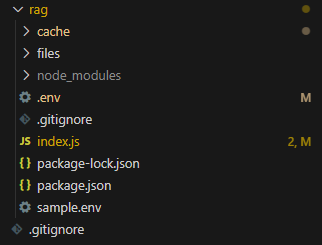
Build the UI and Connect the API
Create a UI using React or another preferred library, and integrate the API query to fetch responses based on your data. This will allow users to interact with the backend and get context-specific answers.
Conclusion
This RAG architecture setup enables your AI applications to reference specific information while still generating human-like, accurate responses. It’s particularly valuable for customer support, content generation, and domain-specific knowledge applications. By combining the retrieval and generation capabilities in Node.js, you’re opening the door to a whole new level of AI-driven applications.
Looking ahead, the future of RAGs and LLMs holds immense potential, with advancements enabling even more personalized and context-aware AI models. Applications of Retrieval Augmented Generation (RAG) are expected to expand across industries such as healthcare, finance, e-commerce, and more, offering smarter, more efficient solutions for real-time data retrieval and intelligent content generation.
Frequently Asked Questions (FAQs)
Retrieval Augmented Generation (RAG) is a technique that combines information retrieval with Gen AI models. It retrieves relevant data from a database or external source and uses this information to generate more accurate, contextually aware responses. RAG in AI enhances the capabilities of AI models by ensuring the responses are not just generated but are informed by specific, up-to-date data, making it ideal for complex applications like customer support or knowledge management.
RAG enhances AI’s ability to generate more precise, contextually relevant answers by leveraging external data sources. It improves the accuracy of responses by incorporating up-to-date information, reducing irrelevant information. Additionally, RAG minimizes the need to train large language models with vast amounts of data, making it a cost-effective approach. It enables AI systems to be more adaptable and dynamic, especially in real-time applications like content generation and customer support.
RAG works by combining two processes: Retrieval and Generation. First, the system retrieves relevant information from a large database or knowledge source using techniques like search engines or vector databases. Then, a generative AI model, such as a transformer, uses this retrieved data to generate coherent, human-like responses. This process ensures that responses are not only generated from the model’s training but also informed by the most relevant data available.
The key difference between Retrieval Augmented Generation (RAG) and Semantic Search lies in the output. Semantic search focuses on retrieving the most relevant documents or data based on the meaning of the query, whereas RAG not only retrieves the information but also generates a human-like response using that data. RAG combines retrieval with generation, allowing for context-specific, conversational AI, while semantic search is more about finding information rather than generating new content from it.
There are several approaches to implementing RAG, primarily based on the retrieval mechanism and generation model.
- One approach is to use traditional search engines or vector-based retrieval for data access, combined with deep learning-based models for generation.
- Another approach involves using specialized vector databases, which optimize the retrieval of information.
- Hybrid methods integrate RAG with other AI techniques, such as reinforcement learning, to further improve accuracy and response generation across diverse use cases.
Share on Social Media
Related Blogs
How to Execute Parallel Processing with Powershell?
Read More: How to Execute Parallel Processing with Powershell?
Importance of UI/UX to Build the Best Website Design for Your Business
Read More: Importance of UI/UX to Build the Best Website Design for Your Business
How to Manage Error Handling and Logging in Node Js?
Read More: How to Manage Error Handling and Logging in Node Js?
5 Internet of Things(IoT) Technologies
Read More: 5 Internet of Things(IoT) TechnologiesStay ahead of the curve
Get the latest insights, tutorials, and industry news delivered straight to your
inbox. Join 10,000+ developers and tech leaders.