

How to create a dynamic LINQ Query In C# using Predicate Builder?
TABLE OF CONTENTS
Share on Social Media
Related Blogs

What is SqlDependency in .NET language?
Read More: What is SqlDependency in .NET language?
How to implement Scatter Gather In Masstransit C#
Read More: How to implement Scatter Gather In Masstransit C#
All About Docker file and Docker Compose: The Ultimate Guide for Developers
Read More: All About Docker file and Docker Compose: The Ultimate Guide for Developers
Overview of MySQL Analytical Functions
Read More: Overview of MySQL Analytical Functions
Introduction
Have you ever tried to provide your users with a way to dynamically build their own query to filter a list? If you ever tried, maybe you found it a little complicated. If you never tried, it could be tedious to do. But, with the help of LINQ, it does not need to be that hard (indeed, it could be even enjoyable).
Description
Predicate Builder is a powerful LINQ expression that is mainly used when too many search filter parameters are used for querying data by writing dynamic query expression. We can write a query like Dynamic SQL.
Background
Scenario
Filter record for the employees having salary > 10000
A typical Linq Predicate used will be
x=> x.salary > 10000
But suppose you want to provide your users a way to choose on which field and with what value they want to filter records like below:
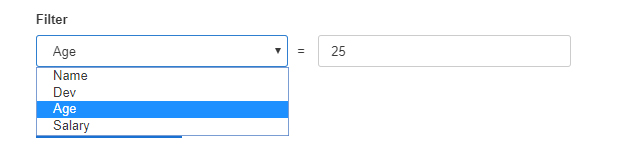
One way is to write predicate for each individual filter and checking each time user hits.
If (filter == "Name")
  result = employees.Where(x=> x.Name ==  {value});
Else If (filter == "Dev")
  result = employees.Where(x=> x.Dev == {value});
Else If (filter == "Age")
  result = employees.Where(x=> x.Age ==  {value});
Else If (filter == "Salary")
  result = employees.Where(x=> x.Salary ==  {value});
Another way is building dynamic predicate based on the user’s selection with less code. Here field name and filter value both will be provided by Use , for each individual criteria no need to write separate code.
var andCriteria = new List();
Expression<Func<Employee, bool>> predicate;
string Fieldname = string.Empty, FieldValue = string.Empty;
var type = t.GetProperty(Fieldname);
                   andCriteria.Add(c => Cast(type.GetValue(c),   type.PropertyType) == Cast(FieldValue, type.PropertyType));

predicate = c => andCriteria.All(pred => pred(c));
result = employees.AsQueryable().Where(predicate).ToList();
You can use the same logic when you want to apply filters on multiple fields and want to sort data.
Demo: Refer Link
Share on Social Media
Related Blogs

Why Choose Cross-Platform Mobile App Development? Which Technology Is The Best?
Read More: Why Choose Cross-Platform Mobile App Development? Which Technology Is The Best?
Mastering OWASP: Safeguarding .NET Applications from Security Vulnerabilities
Read More: Mastering OWASP: Safeguarding .NET Applications from Security Vulnerabilities
Mobile App Development Trends for 2025:How We Help Businesses Stay Ahead
Read More: Mobile App Development Trends for 2025:How We Help Businesses Stay Ahead
Streamlining EMS:Neo4j’s Power to solve Supply Chain Challenges
Read More: Streamlining EMS:Neo4j’s Power to solve Supply Chain ChallengesStay ahead of the curve
Get the latest insights, tutorials, and industry news delivered straight to your
inbox. Join 10,000+ developers and tech leaders.