

What is JavaScript Spread Operator?
TABLE OF CONTENTS
Share on Social Media
Related Blogs

How to Responsive sticky Header, Footer In Html Table?
Read More: How to Responsive sticky Header, Footer In Html Table?
Mastering OWASP: Safeguarding .NET Applications from Security Vulnerabilities
Read More: Mastering OWASP: Safeguarding .NET Applications from Security Vulnerabilities
How to Start with Enterprise Mobile and IOT Strategy
Read More: How to Start with Enterprise Mobile and IOT Strategy
How to Execute Parallel Processing with Powershell?
Read More: How to Execute Parallel Processing with Powershell?
In the below image, the triple dots in the function parameter can be referred to as the Gather operator since it gathers all the arguments passed to that function into one parameter. The same triple dot operator acts as the Spread operator when used in a different context. If the triple dot operator is used in a function parameter then it is the Rest parameter or in other words the Gather operator. Whereas if the triple dot operator is used in the arguments when calling a function then it acts as the Spread operator. Let’s take an example. Following function takes any number of arguments using the rest parameter and returns their sum.
function addNumbers(...numbers){
    return numbers.reduce((num,previousSum)=>num+previousSum);
}
let sum=addNumbers(1,2,3,4,5);
console.log(sum);  //logs 15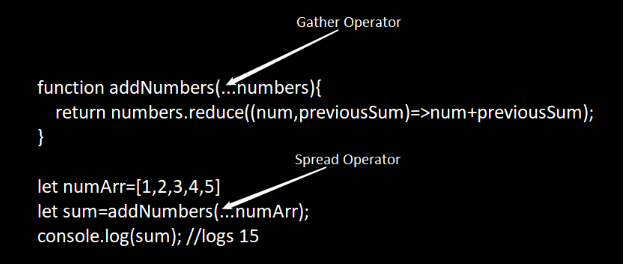
Here, we are passing 5 arguments to addNumbers function and since the addNumbers function’s numbers parameter is using rest parameter syntax, all the passed arguments are gathered into just one parameter named numbers and hence the triple dots operator used here is referred as the gather operator.
Now let’s say if we had an array of numbers and we wanted to call the addNumbers passing all the numbers in the array; we’ll have to do something like shown below.
function addNumbers(...numbers) {
    return numbers.reduce((num, previousSum) => num + previousSum);
}
let nums = [1, 2, 3, 4, 5]
let sum = addNumbers(nums[0], nums[1], nums[2], nums[3], nums[4]);
console.log(sum); //logs 15
As shown in the example, we’ll need to pass the individual array elements to the function. We can simplify the function call using the spread operator while calling the function as shown below.
function addNumbers(...numbers){
    return numbers.reduce((num,previousSum)=>num+previousSum);
}
let numArr=[1,2,3,4,5]
let sum=addNumbers(...numArr);
console.log(sum); //logs 15
In the above example, as the name suggests the spread operator has spread the array values into individual values. When we write …numArr, it spreads the array values as individual values as 1 2 3 4 5.
I have shown the above examples to show how the same triple dot operator behaves based on the context. Spread operator can be used with any data type as long as it is iterable. It can be used even with the string (since it is also iterable) as shown in the following example.
let language='javascript';
let languageCharArray=[...language];
console.log(languageCharArray); //logs ["j", "a", "v", "a", "s", "c", "r", "i", "p", "t"]
In the above example, we have a string variable named language and we are creating an array of its characters using spread operators. To achieve the same result without using the spread operator, we would have to iterate through the language variable using a loop and push each character into the array.
Uses of the Spread Operator
There are many uses of the spread operator and I’ll discuss some of the most common uses here.
Copying an array
The spread operator can be used to copy an array easily. And it creates the actual copy of the array instead of just copying the reference. Let’s take an example.
let originalArray=[1,2,3,4,5];
let copiedArray=[...originalArray];
originalArray.push(6);
console.log(originalArray); // logs [1, 2, 3, 4, 5, 6]
console.log(copiedArray); // logs [1, 2, 3, 4, 5]
In the above code, the statement let copiedArray=[…originalArray];
spreads the values of the originalArray to create a new array and assigns it to the variable copiedArray. And as seen, the copied array is not affected when we add a new value to the original array.
Concatenating an array
The following example shows how the spread operator can be used to concatenate arrays.
let arr1 = [1, 2, 3];
let arr2 = [4, 5, 6];
let arr3 = [7, 8, 9];
let arr4 = [...arr1, ...arr2, ...arr3];
console.log(arr4); // logs [1, 2, 3, 4, 5, 6, 7, 8, 9]
Copying an object
The following example shows how the spread operator can be used to copy an object.
let actor = {
    name: 'Christian Bale',
    born: '01/30/1974',
    nationality: 'British',
    movie: {
        name: 'Batman Begins',
        director: ' Christopher Nolan',
        year: 2005
    }
}
let copiedActor = { ...actor };
console.log(copiedActor.name); // logs Christian Bale
console.log(copiedActor.movie.name); // logs Batman Begins
actor.name = 'Robert Downy Jr.';
actor.movie.name = 'Ironman';
console.log(copiedActor.name); // logs Christian Bale
console.log(copiedActor.movie.name); // logs Ironman
One thing to note here is that the nested movie object is just a shallow copy. So if the value of any property of the movie object is changed then that will be reflected in the movie property of the copied object as well. To deep copy the nested object we need to copy them also using the spread operator as shown below.
let copiedActor = { ...actor, movie: { ...actor.movie } };Combining objects
The spread operator can be used to combine multiple objects as shown in the following example.
let carEngine = {
    power: 425,
    torque: 425
}
let carDimensions = {
    length: 4580,
    width: 2045,
    height: 1135
}
let car = { ...carEngine, ...carDimensions }
console.log(car); // logs {power: 425, torque: 425, length: 4580, width: 2045, height: 1135}
In the above example the statement let car = { …carEngine, …carDimensions } combines the properties of carEngine and carDimensions objects and assigns them to the car object.
Performing immutable operations on arrays and objects
If there is a need to perform some immutable operations on arrays or on objects (e.g. while working with ReactJS states) then spread operator can be very handy. There are traditional array methods like push, unshift, splice etc which are used to modify the array but they mutate the actual array. We can achieve the same result without mutating the actual array using the spread operator as shown in the following examples.
Adding elements at the beginning of the array
let colors = ['cyan', 'gold'];
// Adding items at the beginning of the array, similar to unshift
let newColors = ['aqua', 'black', ...colors];
console.log(colors); // logs ["cyan", "gold"]
console.log(newColors); // logs ["aqua", "black", "cyan", "gold"]
Similarly we can simulate the splice operation as shown below.
let colors = ['aqua', 'black', 'cyan', 'gold'];
//Simulating splice
//Removing ‘black’; adding ‘white’ and ‘silver’
let newColors = [...colors.slice(0, 1), 'white', 'silver', ...colors.slice(2)]
console.log(newColors); // logs  ["aqua", "white", "silver", "cyan", "gold"]
Modifying an object
Following example shows how the spread operator can be used to modify an object without mutating the original object by creating a new object from the existing object and modifying the desired property values.
let car = {
    power: 425,
    torque: 425,
    length: 4580,
    width: 2045,
    height: 1135
}
let newCar = { ...car, length: 4600, width: 2100 };
console.log(newCar); // logs {power: 425, torque: 425, length: 4600, width: 2100, height: 1135}
In the above example, the statement let newCar = { …car, length: 4600, width: 2100 }; copies the car object to the newCar object with the new values of length and width properties.
Share on Social Media
Related Blogs

What is salt and how does it provides an additional layer of security?
Read More: What is salt and how does it provides an additional layer of security?
Modernizing with New Identity of Triveni Global Software Solution LLP
Read More: Modernizing with New Identity of Triveni Global Software Solution LLP
What is API Request and Response Logger
Read More: What is API Request and Response Logger
What are JavaScript Arrow Functions?
Read More: What are JavaScript Arrow Functions?Stay ahead of the curve
Get the latest insights, tutorials, and industry news delivered straight to your
inbox. Join 10,000+ developers and tech leaders.