
Parallel Programming in C#: Different Use Cases
TABLE OF CONTENTS
- Understand Parallel Programming
- The Importance of Parallel Programming in Modern Applications
- 1. CPU-Intensive Computations
- 2. Web API Performance Improvement
- 3. Data Processing with PLINQ
- 4. Real-Time Applications (Game Development, Stock Trading)
- 5. Background Tasks in Desktop Applications
- Conclusion
- Stay ahead of the curve
Share on Social Media
Related Blogs
What are SQL Server Functions?
Read More: What are SQL Server Functions?
Sentry Logging: Improving Application Reliability and Performance
Read More: Sentry Logging: Improving Application Reliability and Performance
Why Choose Cross-Platform Mobile App Development? Which Technology Is The Best?
Read More: Why Choose Cross-Platform Mobile App Development? Which Technology Is The Best?
What is the behavior of Scope in AngularJS Directives?
Read More: What is the behavior of Scope in AngularJS Directives?
Understand Parallel Programming
A computing concept known as parallel programming entails executing several operations concurrently as opposed to sequentially. Applications can complete tasks more quickly and effectively thanks to parallel programming, which makes use of multi-core processors
This is typically accomplished in C# parallel programming through the use of multithreading, parallel loops, and the Task Parallel Library (TPL.NET).
The Importance of Parallel Programming in Modern Applications
High-performance and responsive software is becoming more and more necessary in today’s software applications. Concurrent programming in C# is crucial for developers working on real-time, web, or data-intensive applications.
Nowadays, parallel programming is a crucial component of C# performance optimization, allowing programs to run workloads concurrently and maximize CPU utilization. Asynchronous programming in , Developers create applications that can grow in size and performance without being restricted by hardware limitations.
C# provides excellent support for parallel processing in .NET with the Task Parallel Library, PLINQ in C#, async-await, and concurrent collections in C#. In this blog post, we will discuss real-world use cases where parallel programming examples in C# can be applied. The above image is a parallelism example.
Get practical guidance on structuring complex SQL queries
Book a free consultation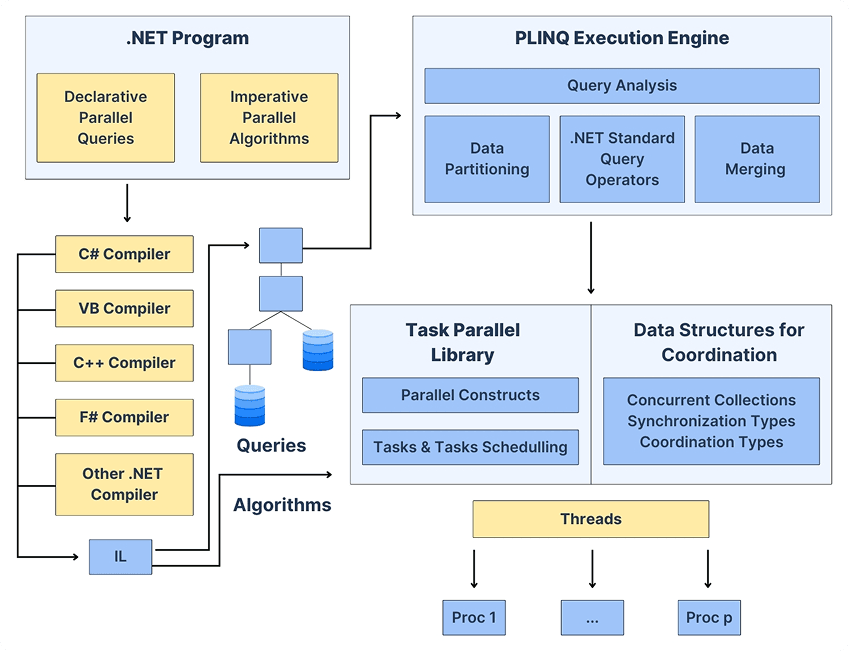
1. CPU-Intensive Computations
Things that need a lot of computer power, like doing math or working with tables of numbers, are good for parallel processing. This means the computer can do lots of things at the same time. Parallel loops are useful for these kinds of things. They help the computer do these tasks on threads at once, which is really helpful for things like numerical computations, matrix computations, and complex algorithms.
Example: Parallelizing a Loop
using System;
using System.Threading.Tasks;

class Program
{
    static void Main()
    {
        Parallel.For(0, 10, i =>
        {
            Console.WriteLine($"Processing {i} on thread {Task.CurrentId}");
        });
    }
}
This method employs parallel foreach in C# to distribute tasks among cores, thus speeding up execution.
Use Case:
This pattern is widely used in image processing, physics engines, and scientific/mathematical computations, where multi-threading in C# is beneficial.
2. Web API Performance Improvement
When we use programming, it can really make our web APIs more responsive. This is because parallel programming can handle a lot of requests at the time. It does this by using something called programming. So programming and asynchronous programming work together to make our web APIs better. Parallel programming is very good at handling requests concurrently which is why it is so useful for web APIs.
Example: Fetching Data from Multiple APIs
using System;
using System.Net.Http;
using System.Threading.Tasks;

class Program
{
    static async Task Main()
    {
        HttpClient client = new HttpClient();
        Task<string> api1 = client.GetStringAsync("https://api.example.com/data1");
        Task<string> api2 = client.GetStringAsync("https://api.example.com/data2");

        await Task.WhenAll(api1, api2);
        Console.WriteLine("Both API calls completed");
    }
}
Asynchronous programming enables the execution of multiple API calls or database operations simultaneously, thus speeding up execution.
Use Case:
This pattern is most appropriate for API composition, database access, file operations, and service communication.
3. Data Processing with PLINQ
PLINQ in C# is really helpful when you need to process a lot of data at the same time. This is because PLINQ supports the processing of LINQ queries. PLINQ is very useful for handling data sets. It makes things easier by taking care of the threads for you, so you do not have to worry about managing them yourself in.NET. PLINQ is a tool for parallel processing in.NET.
Example: Parallel Processing of a Large Dataset
using System;
using System.Linq;

class Program
{
    static void Main()
    {
        var numbers = Enumerable.Range(1, 1000000);
        var evenNumbers = numbers.AsParallel().Where(n => n % 2 == 0).ToList();
        Console.WriteLine($"Found {evenNumbers.Count} even numbers");
    }
}
PLINQ automatically breaks down data and processes it in parallel threads.
Use Case:
Useful for big data analysis, ETL processing, batch processing, and data filtering operations on large data sets.
4. Real-Time Applications (Game Development, Stock Trading)
Real-time applications need to do a lot of things at the same time. This is where concurrent programming comes in. Concurrent programming helps real-time applications handle things like updates, calculations, and logic all at once without waiting. Real-time applications really need programming to work properly.
Example: Running Multiple Game Objects in Parallel
using System;
using System.Threading.Tasks;

class Program
{
    static async Task Main()
    {
        Task playerMovement = Task.Run(() => Console.WriteLine("Player Moving..."));
        Task enemyAI = Task.Run(() => Console.WriteLine("Enemy AI Processing..."));

        await Task.WhenAll(playerMovement, enemyAI);
    }
}
Parallel execution helps applications run smoothly in real-time applications.
Use Case:
Required for game physics, AI logic, live stock trading systems, and real-time monitoring systems.
5. Background Tasks in Desktop Applications
Executing long-running operations on the main thread results in frozen applications. The Task Parallel Library C# helps process background operations efficiently without freezing the UI.
Example: Running a Background Task Without Freezing UI
using System;
using System.Threading.Tasks;
using System.Windows.Forms;

public class MainForm : Form
{
    private Button btnProcess;

    public MainForm()
    {
        btnProcess = new Button { Text = "Start Process", Width = 150 };
        btnProcess.Click += async (s, e) => await ProcessData();
        Controls.Add(btnProcess);
    }

    private async Task ProcessData()
    {
        await Task.Run(() =>
        {
            // Simulating a long-running process
            System.Threading.Thread.Sleep(3000);
            MessageBox.Show("Processing Complete");
        });
    }
}
This technique helps improve the user experience by executing operations in the background threads.
Use Case:
Common in desktop applications for file processing, data loading, background updates, and synchronization operations.
Conclusion
Parallel programming in C# is really useful because it helps make applications work better and faster. The Task Parallel Library and PLINQ, parallel loops, and async-await in C# parallel programming let developers make applications that can handle a lot of work and are very fast. C# parallel programming is a way to make applications that are scalable and have high performance. This is what makes C# parallel programming is so good, for making applications that need to do a lot of things at the time.
Knowledge of efficient thread-safe programming practices in C# and the ability to apply parallel programming concepts where necessary ensure optimal performance with minimal complexity. Parallel programming, when applied correctly, is a very effective technique in most real-world .NET applications.
Share on Social Media
Related Blogs
Node.js Development Services:The Smart Way to Build Scalable Applications
Read More: Node.js Development Services:The Smart Way to Build Scalable Applications
Everything You Need to Know About Digital Twin Technology: A Game Changer for Industries
Read More: Everything You Need to Know About Digital Twin Technology: A Game Changer for Industries
A Guide to Transformer Architecture: The Brain Behind ChatGPT
Read More: A Guide to Transformer Architecture: The Brain Behind ChatGPT
How to create a dynamic LINQ Query In C# using Predicate Builder?
Read More: How to create a dynamic LINQ Query In C# using Predicate Builder?Stay ahead of the curve
Get the latest insights, tutorials, and industry news delivered straight to your
inbox. Join 10,000+ developers and tech leaders.