
Sentry Logging: Improving Application Reliability and Performance
TABLE OF CONTENTS
- Introduction
- Business Problem
- Challenges and Risks
- Why Traditional Logging Is No Longer Enough
- Solution Approach: Understanding Sentry Logging
- Real-World Use Case
- Industry Insights
- Benefits of Using Sentry Logging
- Best Practices for Sentry Logging
- Future Trends
- Conclusion
-
Frequently Asked Questions (FAQs)
- What is Sentry used for?
- How is Sentry different from traditional logging tools?
- Which programming languages and frameworks does Sentry support?
- Can Sentry monitor application performance in addition to errors?
- What types of logs should be sent to Sentry?
- Is it safe to send application logs to Sentry?
- Stay ahead of the curve
Share on Social Media
Related Blogs
Accelerate ReactJS Deployment: A Quick Guide to Azure DevOps Pipeline
Read More: Accelerate ReactJS Deployment: A Quick Guide to Azure DevOps Pipeline
What is the identity server in ASP.NE core ?
Read More: What is the identity server in ASP.NE core ?
What are solid principles with examples in C#
Read More: What are solid principles with examples in C#
How to do Playwright End to End Testing?
Read More: How to do Playwright End to End Testing?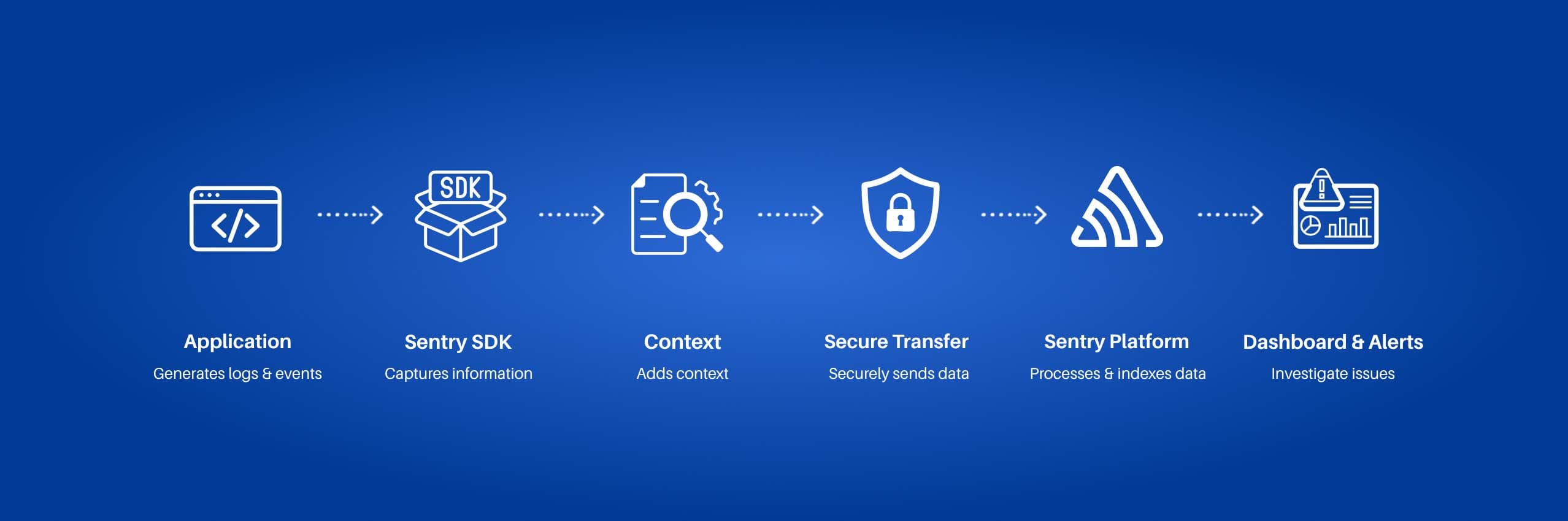
Introduction
Every application failure comes with a business cost. Whether it is a slow checkout process, an API outage, or an unexpected software error, downtime can impact customer experience, employee productivity, and revenue. As organizations increasingly adopt cloud-native architectures, microservices, and distributed systems, monitoring application health has become a critical business requirement.
Traditional logging tools often generate large volumes of data but provide limited visibility into the root cause of issues. Development and operations teams can spend hours searching through logs, delaying issue resolution and increasing operational risks.
This is where Sentry Logging plays an important role. By combining error tracking, performance monitoring, structured logging, and distributed tracing, Sentry provides organizations with a unified approach to application monitoring and observability.
Business Problem
Modern applications are more complex than ever before. A single application may involve multiple APIs, databases, cloud services, third-party integrations, and microservices working together.
As complexity increases, organizations often face challenges such as:
- Difficulty identifying the root cause of production issues
- Limited visibility into application performance
- Slow incident response times
- Increased downtime and service disruptions
- Poor understanding of user impact during failures
Without effective Application Monitoring Solutions, these challenges can negatively affect software quality, customer satisfaction, and business growth.
Challenges and Risks
Extended Downtime
When issues are not detected quickly, applications can remain unavailable for longer periods, resulting in lost revenue and reduced customer trust.
Slow Troubleshooting
Teams often spend significant time manually reviewing logs and switching between multiple monitoring tools to identify problems.
Poor User Experience
Application crashes, failed transactions, and slow response times can frustrate users and increase customer churn.
Increased Operational Costs
Long investigation cycles consume valuable engineering resources and increase support costs.
Limited Visibility Across Systems
Traditional monitoring approaches often fail to provide complete visibility into modern distributed environments, making issue resolution more difficult.
Why Traditional Logging Is No Longer Enough
Traditional logging tools are designed to collect and store log data. While this information is valuable, it often lacks the context required to diagnose issues quickly.
Sentry Logging improves software reliability and observability by connecting logs with:
- Error events
- Stack traces
- User activity
- Performance metrics
- Transaction details
Instead of viewing logs as isolated records, teams gain a complete picture of application behavior, helping them identify and resolve issues faster.
Solution Approach: Understanding Sentry Logging
Sentry is an application monitoring platform designed to help development teams detect, investigate, and resolve issues in real time.
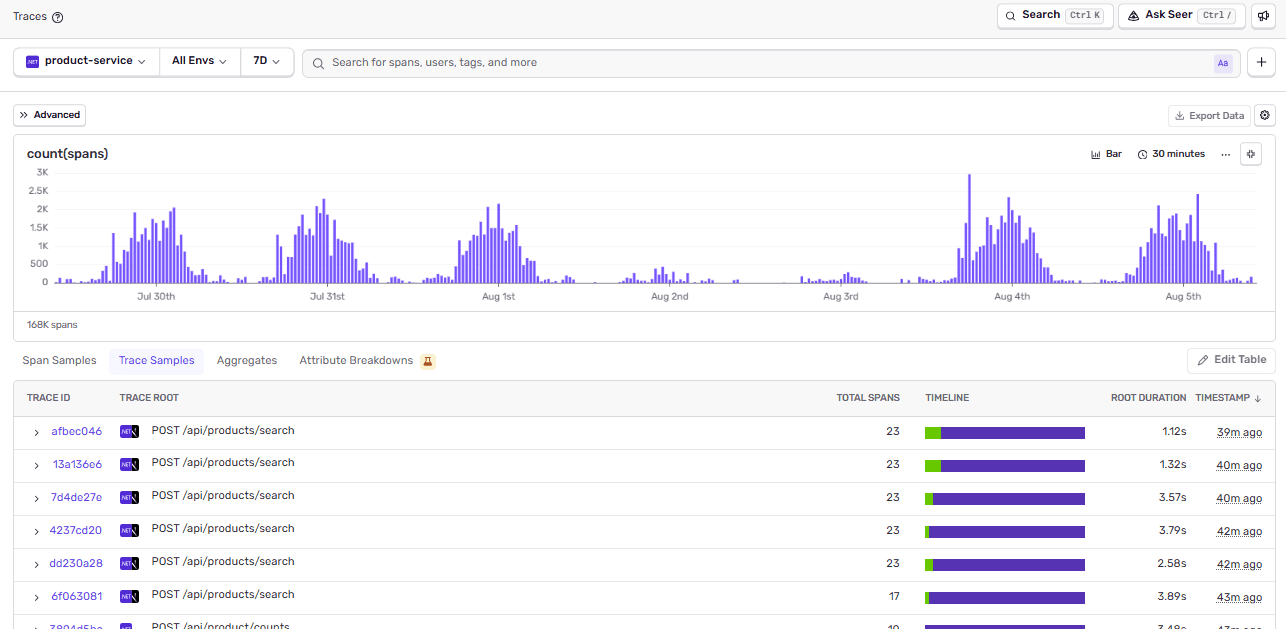
Sentry Issues Dashboard showing real-time error tracking, issue prioritization, and application monitoring insights.
Key Features of Sentry
- Real-time error tracking
- Performance monitoring
- Distributed tracing
- Structured logging
- Release tracking
- User impact analysis
- Alerting and notifications
- Integration with popular development tools
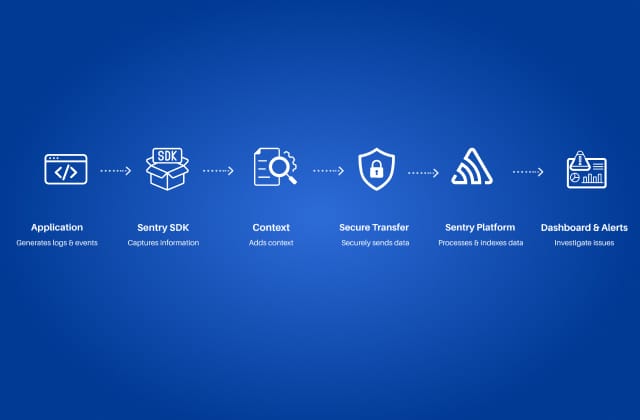
How Sentry Logging Works
The process typically follows these steps:
- The application generates logs and events.
- The Sentry SDK captures the information.
- Additional context is attached.
- Data is securely transmitted to Sentry.
- Sentry processes and indexes the information.
- Teams investigate issues through dashboards and alerts.
Workflow:
Application → Sentry SDK → Sentry Platform → Dashboard & Alerts
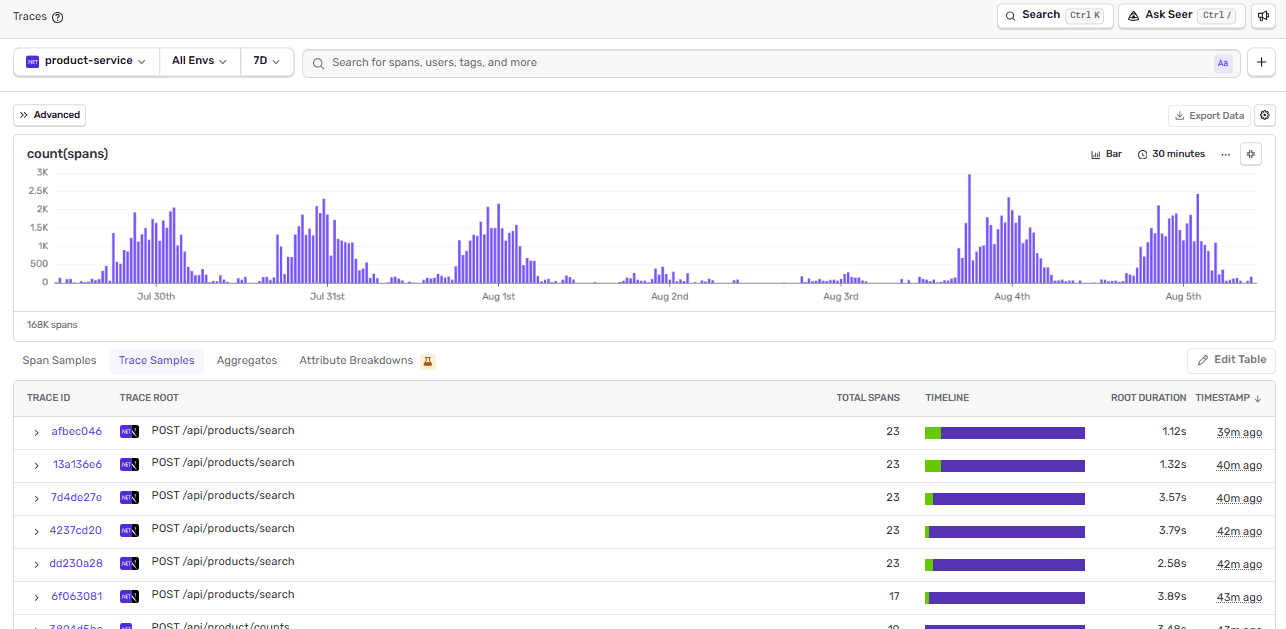
Sentry distributed tracing dashboard providing visibility into application transactions, request flows, and performance metrics.
Contextual Logging for Better Insights
One of the most valuable capabilities of Sentry Logging is contextual logging. It enriches log data with:
- User information
- Environment details
- Request metadata
- Release versions
- Stack traces
- Custom tags and attributes
This additional context significantly improves real-time error tracking and helps teams reduce troubleshooting time.
Real-World Use Case
Consider a SaaS company launching a new feature that unexpectedly causes API failures.
Using traditional logging, developers may spend hours searching through multiple systems to identify the issue. With Sentry Logging, related errors are automatically grouped and linked with transaction data, user actions, and performance metrics.
As a result, engineering teams can quickly identify the root cause, resolve the issue faster, and minimize customer impact. This not only improves operational efficiency but also protects customer experience and business reputation.
Industry Insights
Organizations across industries are investing in cloud application monitoring and observability platforms to improve operational efficiency and software reliability.
Healthcare
Healthcare organizations use monitoring solutions to maintain the reliability of patient-facing applications and critical healthcare systems.
Financial Services
Financial institutions monitor transaction failures and performance bottlenecks to reduce business risk and improve customer trust.
Retail and E-Commerce
Retail businesses rely on application monitoring to ensure smooth checkout experiences and prevent revenue-impacting outages.
Manufacturing
Manufacturers use observability tools to monitor connected systems, workflows, and digital operations across facilities.
SaaS and Enterprise Software
Software companies leverage monitoring platforms to support continuous releases while maintaining application stability and performance.
Benefits of Using Sentry Logging
Faster Issue Detection
Real-time monitoring enables teams to identify and respond to problems immediately before they impact a larger user base.
Reduced Mean Time to Resolution (MTTR)
By correlating logs, errors, and performance data, Sentry accelerates root cause analysis and incident resolution.
Improved Application Reliability
Continuous monitoring helps organizations prevent recurring issues and improve overall system stability.
Better Developer Productivity
Developers spend less time investigating incidents and more time building valuable features and innovations.
Enhanced User Experience
Faster issue resolution leads to more reliable applications and higher customer satisfaction.
Stronger Observability
A unified view of logs, traces, and performance metrics provides better visibility into overall system health and application behavior.
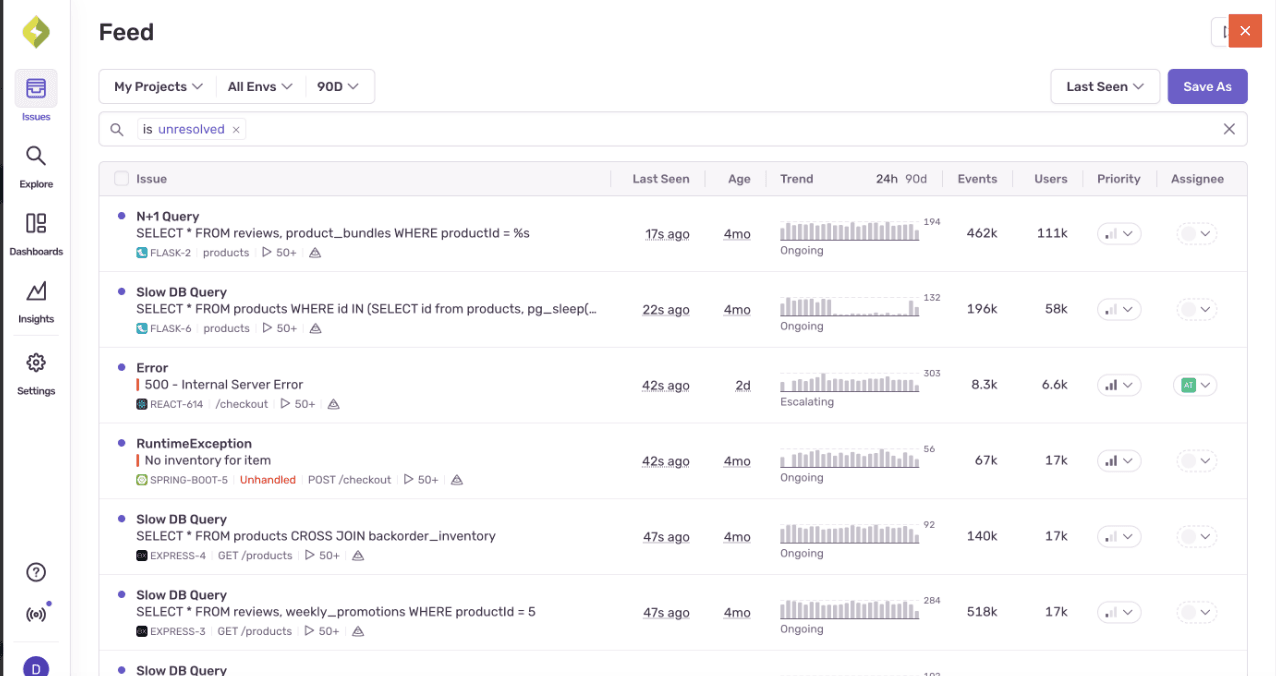
Sentry distributed tracing dashboard providing visibility into application transactions, request flows, and performance metrics.
Best Practices for Sentry Logging
Organizations can maximize the value of Sentry Logging by following these DevOps monitoring best practices:
Use Structured Logging
Include meaningful information such as timestamps, service names, request IDs, and environment details.
Set Appropriate Log Levels
Use Debug, Info, Warning, Error, and Fatal levels consistently to improve log management and alert quality.
Avoid Logging Sensitive Information
Never log passwords, authentication tokens, credit card information, or personally identifiable information (PII).
Include Relevant Context
Attach useful metadata such as transaction IDs, user IDs, service names, and release versions to improve troubleshooting efficiency.
Monitor Performance Alongside Logs
Combining logs with performance monitoring provides deeper insights into application behavior and helps identify bottlenecks more effectively.
Future Trends
Application monitoring is evolving rapidly as organizations seek more intelligent ways to manage software systems.
Key trends include:
- AI-powered anomaly detection
- Predictive issue identification
- Automated root cause analysis
- Intelligent alerting systems
- Advanced distributed tracing
- Unified observability platforms
These innovations will help organizations proactively identify issues, improve performance, and strengthen software reliability and observability across increasingly complex environments.
Conclusion
Modern applications require more than traditional logging. By combining structured logging, real-time error tracking, performance monitoring, and distributed tracing, Sentry helps organizations improve software reliability, reduce downtime, and accelerate issue resolution.
As businesses continue their digital transformation journey, adopting modern observability solutions will be essential for maintaining performance, scalability, and a superior user experience.
Frequently Asked Questions (FAQs)
Sentry is an application monitoring platform that helps developers identify, track, and resolve errors, monitor application performance, and improve overall software reliability.
Traditional logging tools primarily store and search logs, while Sentry correlates logs with errors, stack traces, transactions, and performance data, making it easier to diagnose issues.
Sentry supports a wide range of technologies, including JavaScript, React, Angular, Vue, Node.js, Python, Java, .NET, PHP, Ruby, Go, and many others.
Yes. Sentry provides Application Performance Monitoring (APM), distributed tracing, and performance metrics alongside error tracking.
You can send logs at various levels such as Debug, Info, Warning, Error, and Fatal. Focus on logging meaningful events that aid troubleshooting while avoiding excessive noise.
Yes, provided sensitive information such as passwords, authentication tokens, credit card details, and personally identifiable information (PII) is filtered or masked before being sent.
Share on Social Media
Related Blogs

What is JavaScript Spread Operator?
Read More: What is JavaScript Spread Operator?
All About Docker file and Docker Compose: The Ultimate Guide for Developers
Read More: All About Docker file and Docker Compose: The Ultimate Guide for Developers
Basics of NLP : Zero to One
Read More: Basics of NLP : Zero to One
5 Useful JavaScript tips and tricks and best practices
Read More: 5 Useful JavaScript tips and tricks and best practicesStay ahead of the curve
Get the latest insights, tutorials, and industry news delivered straight to your
inbox. Join 10,000+ developers and tech leaders.