
Micro Frontends Best Practices: Do’s and Don’ts You Need to Know
TABLE OF CONTENTS
Share on Social Media
Related Blogs

How to Use CTEs in MS SQL Server for Hierarchical Data and Query Optimization
Read More: How to Use CTEs in MS SQL Server for Hierarchical Data and Query Optimization
Importance of Estimation in Software Development The First Step to Success
Read More: Importance of Estimation in Software Development The First Step to Success
Understanding React Portals (createPortal) -Use Cases, Advantages, and Limitations
Read More: Understanding React Portals (createPortal) -Use Cases, Advantages, and Limitations
What is Docker? How to Deploy and Install Redis in Docker
Read More: What is Docker? How to Deploy and Install Redis in Docker
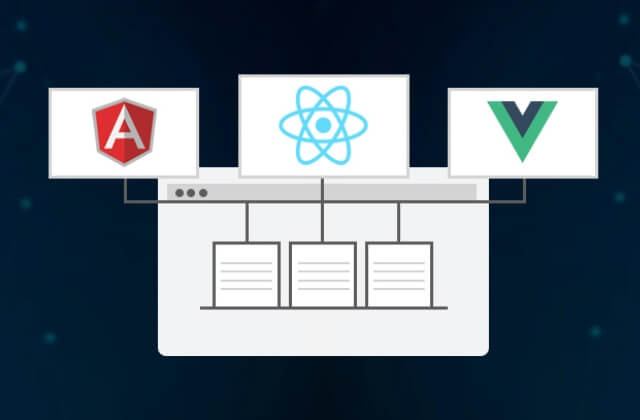
In recent years of web development, architectural approaches like Micro Frontends have gained significant traction. Micro Frontends advocate for the decomposition of a web application into small, independently deployable frontend applications, each responsible for a distinct feature or functionality. While this approach offers numerous advantages such as flexibility, scalability, and parallel development, it also comes with its own set of challenges and pitfalls.
In this guide, we’ll explore the essential do’s and don’ts to help you craft exceptional user experiences with Micro Frontends.
Do’s of Micro Frontends: Top 10 Essentials to Craft Exceptional User Experience
1. Decompose UI into Micro Frontends Appropriately
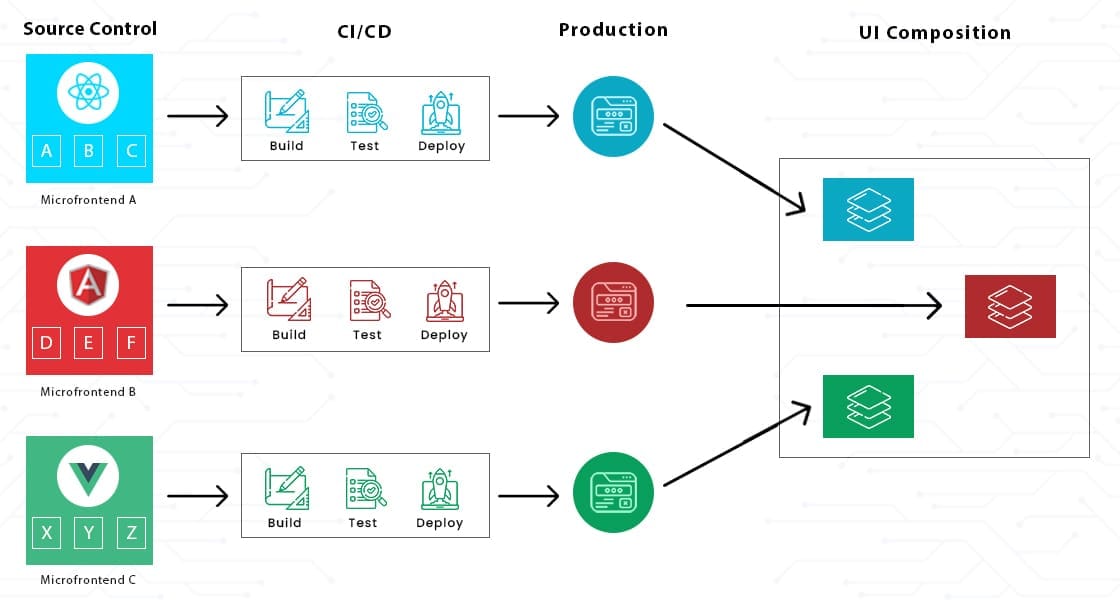
Break down the application’s UI into smaller and self-contained applications in a way that each micro frontend represents a cohesive piece of functionality or a bounded context within the application. Each micro frontend should be able to be developed and deployed separately.
2. Ensure Consistent UI/UX
Define and adhere to UI/UX guidelines for the entire application to ensure the consistent and seamless User Experience in spite of having separate micro frontends.
3. Embrace Technology Agnosticism
Empower teams to choose the best technologies and frameworks for their micro frontends, allowing flexibility and innovation. For example, one team might prefer React while another might choose Angular.
4. Error Handling
Plan for a robust error handling to avoid failure of the entire application due to failure of one micro frontend. Consider scenarios such as unavailability of any micro frontend, network failure, etc. Implement failure resiliency and fallback mechanism.
5. Ensure Version Compatibility of the Dependencies
Ensure that the versions of the dependencies such as external libraries in each micro frontend are compatible with one another. Try to use the same version of such libraries in each micro frontend whenever possible.
6. Cross-Cutting Concerns
Managing cross-cutting concerns such as authentication, authorization, routing, and state management across multiple micro frontends can be complex.
7. Automate Testing
Implement unit tests in each micro frontend to make sure it works correctly. Additionally, implement integration tests and end to end tests to make sure the application as whole works as desired.
8. Automate Deployment
Implement CI/CD (Continuous Integration and Delivery) pipelines to automate the build, testing and deployment for faster, smoother and error-free releases.
9. Effective Cross-Team Collaboration
Since multiple autonomous teams are involved in micro frontends development, the cross-team collaboration becomes crucial. Make sure each team communicates regularly for either progress reports or knowledge sharing.
10. Consider Business Evolution
Just as a company’s products and services can evolve, so too can its micro frontend architecture. It’s important to have a flexible approach to micro frontend development, so that the architecture can be adjusted as the needs of the business change.
Don’ts of Micro Frontends: 4 Common Mistakes to Avoid
1. Avoid Tight Coupling Between Micro Frontends
If the application is decomposed into micro frontends incorrectly without clear boundaries, they may depend too much on one another resulting in tight coupling. Avoid this situation since this will cause issues in development and deployment.
2. Avoid UI Framework/Library Specific Solution for Communication Between Micro Frontends
While it makes it easier to use framework/library specific solutions to communicate between micro frontends, it introduces dependencies on that specific framework/library to be used in all such micro frontends. Avoid using such solutions whenever possible. If it’s absolutely certain that each micro frontend will be using the same UI framework/library then the framework/library specific solution may be acceptable.
3. Don’t Ignore Performance Considerations
Optimize the performance of each micro frontend and the overall application to provide a seamless user experience. Employ techniques such as code splitting, lazy loading, caching etc.
4. Don’t Avoid Documenting
Since multiple micro frontends and multiple teams are involved, not having proper documentation would make cross team collaboration hard. It would also make onboarding new team members slow and painful.
Conclusion
In conclusion, while Micro Frontends offer a promising approach to web application development, it’s essential to adhere to best practices and avoid common pitfalls. By following the outlined do’s and don’ts, you can harness the full potential of Micro Frontends to deliver exceptional user experiences while adapting to the evolving needs of your business. Remember, effective implementation and continuous refinement are key to success in the realm of Micro Frontends.
Share on Social Media
Related Blogs

MongoDB Replica Set – Ensuring Reliability & High Availability for Your Data Storage
Read More: MongoDB Replica Set – Ensuring Reliability & High Availability for Your Data Storage
Understanding Async and Await in C# Programming : A Simplified Guide to Asynchronous Programming in C#
Read More: Understanding Async and Await in C# Programming : A Simplified Guide to Asynchronous Programming in C#
What is JavaScript Spread Operator?
Read More: What is JavaScript Spread Operator?
What is Artificial Neural Network (ANN)?
Read More: What is Artificial Neural Network (ANN)?Stay ahead of the curve
Get the latest insights, tutorials, and industry news delivered straight to your
inbox. Join 10,000+ developers and tech leaders.