

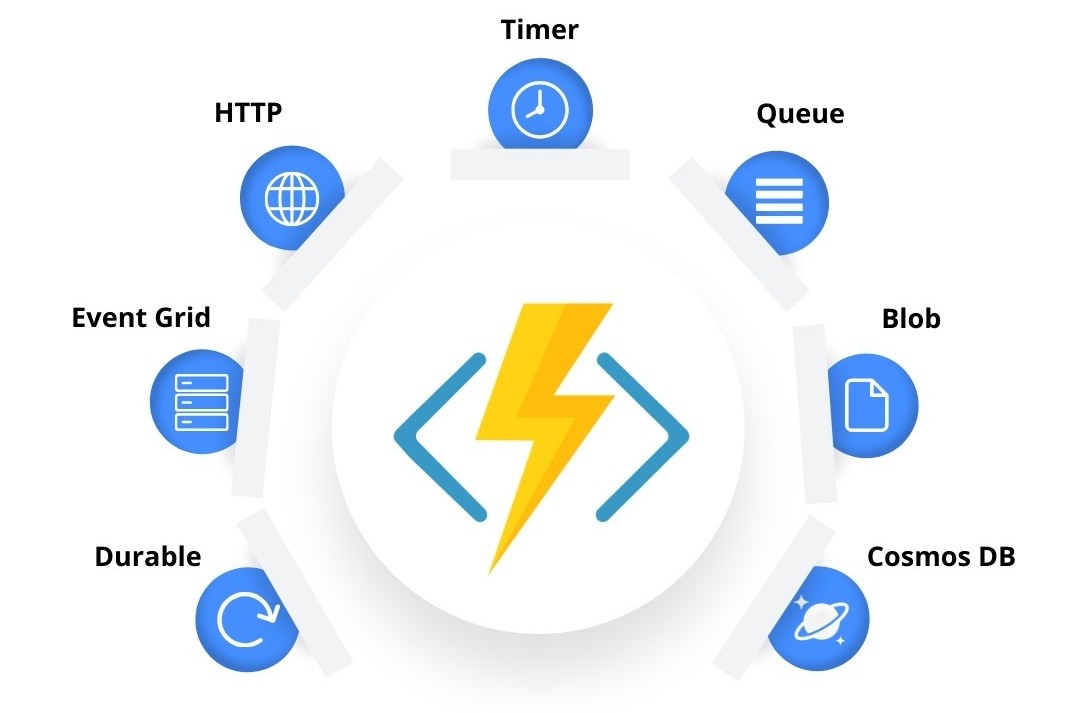
Serverless computing is revolutionizing the way developers build and scale applications — and Azure Functions are at the heart of this shift in the Microsoft ecosystem. These lightweight, event-driven components let you run code without provisioning or managing infrastructure. In this blog, we’ll explore 7 essential Azure Function triggers, each explained with a real-world scenario and C# sample code.
Azure Function Triggers
Need Azure Function implementation support?
Our certified Azure developers can build custom serverless solutions tailored to your business needs.
HTTP Trigger Function — Build Lightweight APIs
An HTTP Trigger Function enables you to create RESTful endpoints that respond to HTTP GET or POST requests — perfect for APIs, form submissions, or integrations.
Sample Use Case: Hello API
1
2
3
4
5
6
7
[FunctionName("HttpTriggerExample")]
public static IActionResult Run(
    [HttpTrigger(AuthorizationLevel.Function, "get", "post")] HttpRequest req)
{
    string name = req.Query["name"];
    return new OkObjectResult($"Hello, {name}!");
}
Timer Trigger Function—Scheduled Jobs (CRON)
Timer triggers are ideal for automating background jobs like daily reports, reminders, or data cleanups using a CRON expression.
Real Use Case: Daily Sales Report at 7:00 AM
1
2
3
4
5
6
7
8
9
10
[FunctionName("DailySalesReport")]
public static async Task Run(
    [TimerTrigger("0 0 7 * * *")] TimerInfo myTimer,
    ILogger log)
{
    log.LogInformation($"Function executed at: {DateTime.UtcNow}");
    var salesData = await GetDailySalesDataAsync();
    var report = GenerateReport(salesData);
    await SendEmailAsync(report);
}
CRON Expression Format
| Expression | Description |
|---|---|
0 */5 * * * * |
Every 5 minutes |
0 0 7 * * * |
Every day at 7 AM UTC |
0 0 9 * * 1 |
Every Monday at 9 AM UTC |
Queue Trigger Function—Asynchronous Processing
Queue triggers let you respond to new messages in Azure Storage Queues, ideal for order processing, background jobs, or email sending.
Sample Use Case: Order Fulfillment
1
2
3
4
5
6
7
8
9
[FunctionName("ProcessOrder")]
public static async Task Run(
    [QueueTrigger("orders-queue", Connection = "AzureWebJobsStorage")] string orderMessage,
    ILogger log)
{
    var order = JsonConvert.DeserializeObject<Order>(orderMessage);
    log.LogInformation($"Processing order #{order.OrderId} for {order.CustomerName}");
    await Task.Delay(2000); // simulate work
}
Blob Trigger Function — File-Based Workflows
Blob triggers automatically run when a new file (e.g. PDF, image) is uploaded to Azure Blob Storage — excellent for document processing, image resizing, or metadata extraction.
Use Case: Invoice Processing
1
2
3
4
5
6
7
8
9
10
[FunctionName("ProcessInvoice")]
public static async Task Run(
    [BlobTrigger("invoices/{name}", Connection = "AzureWebJobsStorage")] Stream invoiceBlob,
    string name,
    ILogger log)
{
    using var reader = new StreamReader(invoiceBlob);
    string fileContent = await reader.ReadToEndAsync();
    log.LogInformation($"Invoice '{name}' read with {fileContent.Length} characters");
}
Event Grid Trigger Function — Event-Driven Architecture
Azure Event Grid lets you build real-time, event-driven solutions that react to Azure resource changes, blob uploads, or custom events.
Use Case: Auto-Archive Deallocated VMs
1
2
3
4
5
6
7
8
9
10
[FunctionName("VMDeallocationEventHandler")]
public static async Task Run(
    [EventGridTrigger] EventGridEvent eventGridEvent,
    ILogger log)
{
    JObject data = eventGridEvent.Data as JObject;
    string vmName = data["resource"]?.ToString();
    log.LogInformation($"Archiving VM: {vmName}");
    await Task.Delay(500); // simulate archive
}
Orchestration Function (Durable) — Manage Complex Workflows
Durable Functions let you orchestrate workflows by chaining multiple functions together, maintaining state and ensuring reliability even across retries and restarts.
Use Case: Order Workflow
Orchestrator:
1
2
3
4
5
6
7
8
9
[FunctionName("OrderOrchestrator")]
public async Task RunOrchestrator(
    [OrchestrationTrigger] IDurableOrchestrationContext context)
{
    var orderId = context.GetInput<string>();
    await context.CallActivityAsync("ValidateOrder", orderId);
    await context.CallActivityAsync("ProcessPayment", orderId);
    await context.CallActivityAsync("SendConfirmationEmail", orderId);
}
Activity Functions:
1
2
3
[FunctionName("ValidateOrder")]
public Task ValidateOrder([ActivityTrigger] string orderId, ILogger log) =>
    Task.CompletedTask;
HTTP Starter:
1
2
3
4
5
6
7
8
9
10
[FunctionName("StartOrderProcessing")]
public async Task<HttpResponseMessage> Start(
    [HttpTrigger(AuthorizationLevel.Function, "post")] HttpRequestMessage req,
    [DurableClient] IDurableOrchestrationClient starter,
    ILogger log)
{
    var orderId = await req.Content.ReadAsStringAsync();
    string instanceId = await starter.StartNewAsync("OrderOrchestrator", orderId);
    return starter.CreateCheckStatusResponse(req, instanceId);
}
Cosmos DB Trigger — Real-Time Data Processing
React to insert, update, or delete operations in your Cosmos DB collection. Great for syncing changes, sending notifications, or triggering data pipelines.
Use Case: Process Document Changes
1
2
3
4
5
6
7
8
9
10
11
12
13
14
15
[FunctionName("CosmosDBChangeHandler")]
public static void Run(
    [CosmosDBTrigger(
        databaseName: "YourDatabaseName",
        collectionName: "YourCollectionName",
        ConnectionStringSetting = "CosmosDBConnectionString",
        LeaseCollectionName = "leases",
        CreateLeaseCollectionIfNotExists = true)] IReadOnlyList<Document> documents,
    ILogger log)
{
    foreach (var document in documents)
    {
        log.LogInformation($"Document changed: {document.GetPropertyValue<string>("id")}");
    }
}
How to Create and Deploy Azure Functions
1. Create a Function App in the Azure Portal
2. Choose Your Trigger Type (HTTP, Timer, etc.)
3. Write & Deploy Code via Azure Portal or Visual Studio Code
4. Monitor Logs & Execution in the Monitor tab
Limitations of Azure Functions
- Cold Starts: Can be slow on the first call.
- Timeouts: Consumption plan limits (5 minutes default, 60 max).
- State Management: Must use Durable Functions or external storage.
- Vendor Lock-In: Heavily tied to Azure ecosystem.
Ready to Deploy Production-Ready Azure Functions?
Partner with our Azure-certified team for end-to-end, Function App development, optimization, and support.
Conclusion
Azure Functions offer a cost-effective, scalable, and developer-friendly approach to building serverless applications. From APIs and scheduled jobs to workflow orchestration and real-time event processing, they allow you to focus on business logic while Azure handles the rest.
Whether you’re building your first function or designing a complex distributed system, Azure Functions can dramatically accelerate your cloud journey.